[Tutorial] How to Buy Crypto: A Guide to Purchasing USDT with Fiat Currency (Tested July 2021)
![[Tutorial] How to Buy Crypto: A Guide to Purchasing USDT with Fiat Currency (Tested July 2021)](https://devcdn.pseo.one/694b8c5feb29738fb9516944/694b8c5fd1cc3dd4fcb00fe5/tutorial-how-to-buy-crypto-a-guide-to-purchasing-usdt-with-fiat-currency-tested-july-2021/cover-buy-USDT-on-binance.png)
[Tutorial] How to Buy Crypto: A Guide to Purchasing USDT with Fiat Currency (Tested Effective as of July 2021)
Tutorial Content:
A complete guide on how to use fiat currency to buy Bitcoin, along with frequently asked questions. Perfect for beginners. (Tested effective as of July 2021.)
This tutorial is simple and effective, brought to you by Squirrel. Please read the steps carefully and follow them precisely; you will definitely succeed. Let's get started!
Step 0: Preparation
All operations in this tutorial require a VPN connection (South Korea, Japan, or Singapore are fine; the United States is NOT!). Please ensure you have "Global Mode" enabled. You can download a VPN from the Squirrel VPN official website; new users get a 3-day free trial. Once the Squirrel VPN is connected, we can begin!
Currently, the safest and highest-volume exchanges are the "Big Three": OKEx, Huobi, and Binance.
Official websites: OKEx Exchange: https://www.okex.com/ Huobi Exchange: https://www.huobi.com/ Binance Exchange: https://www.binance.com/
Because their official websites are restricted, there are many mirror sites in mainland China that are difficult to distinguish from the real ones. Please do not use them. Please ensure you use the official addresses above to visit the websites for registration and purchasing.
Step 1: Exchange Official Website: Register an Account
The user experience for the three major exchanges is very similar. We will use Binance as an example below: Binance has the highest trading volume and is based overseas, so it is highly recommended:
Go to the official website and click the "Register" button in the top right corner. Binance Exchange Official Website: https://www.binance.com/ Fill in your email, set a password, and enter the verification code to complete registration.
Note: If you are only doing crypto-to-crypto trading, registering with an email is sufficient; a phone number is not required. For fiat trading, you can use either an email or a phone number, as identity verification will be required later. Note: Please ensure you are on the official Binance website. There are many mirror sites in mainland China that are hard to verify. It is recommended to connect to a VPN and use the official website to register.
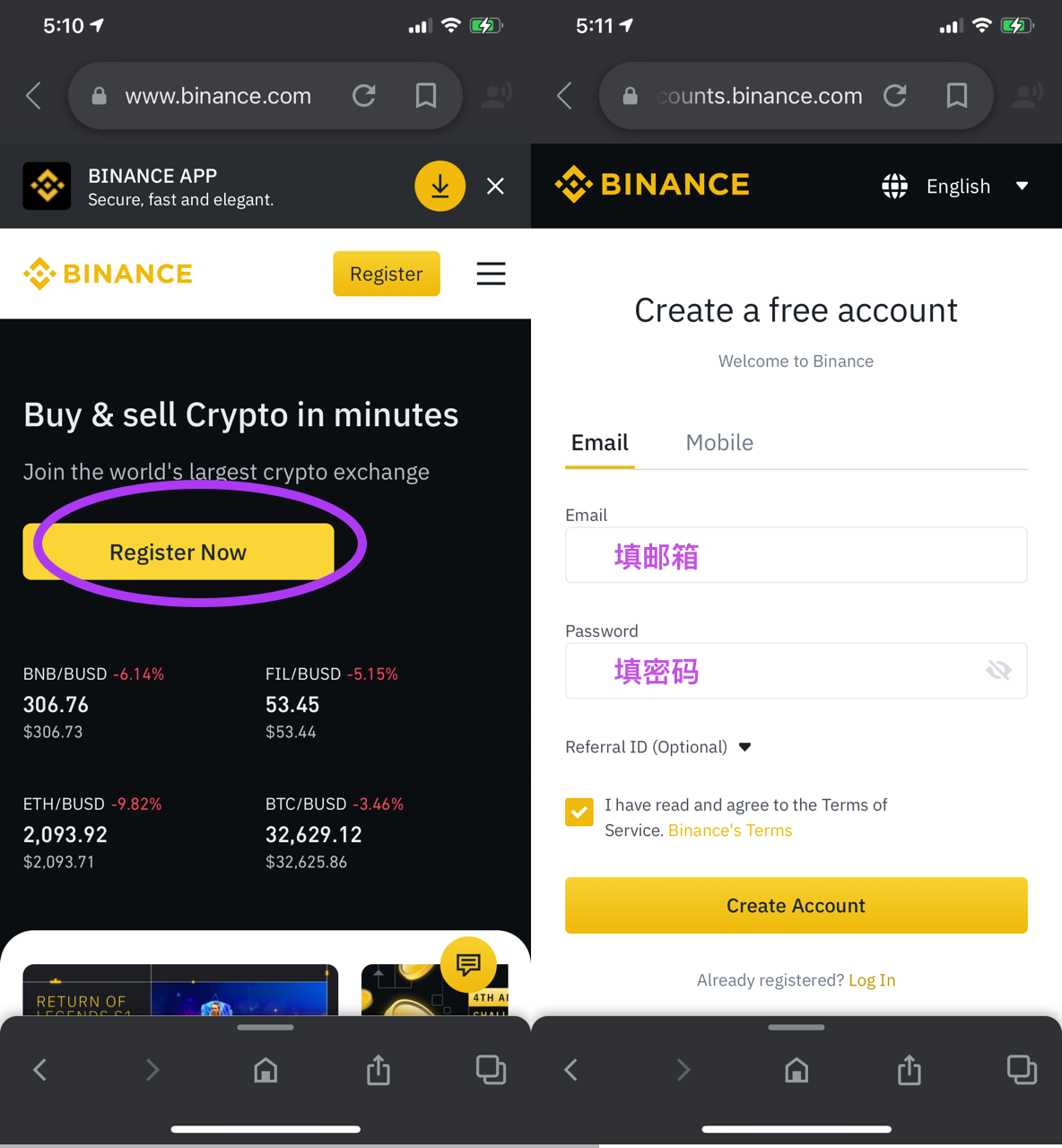
Step 2: Download the Binance Mobile App
After registration, return to the homepage and click "Download" in the top right corner to find the mobile app download options. Future operations will be performed within the app.
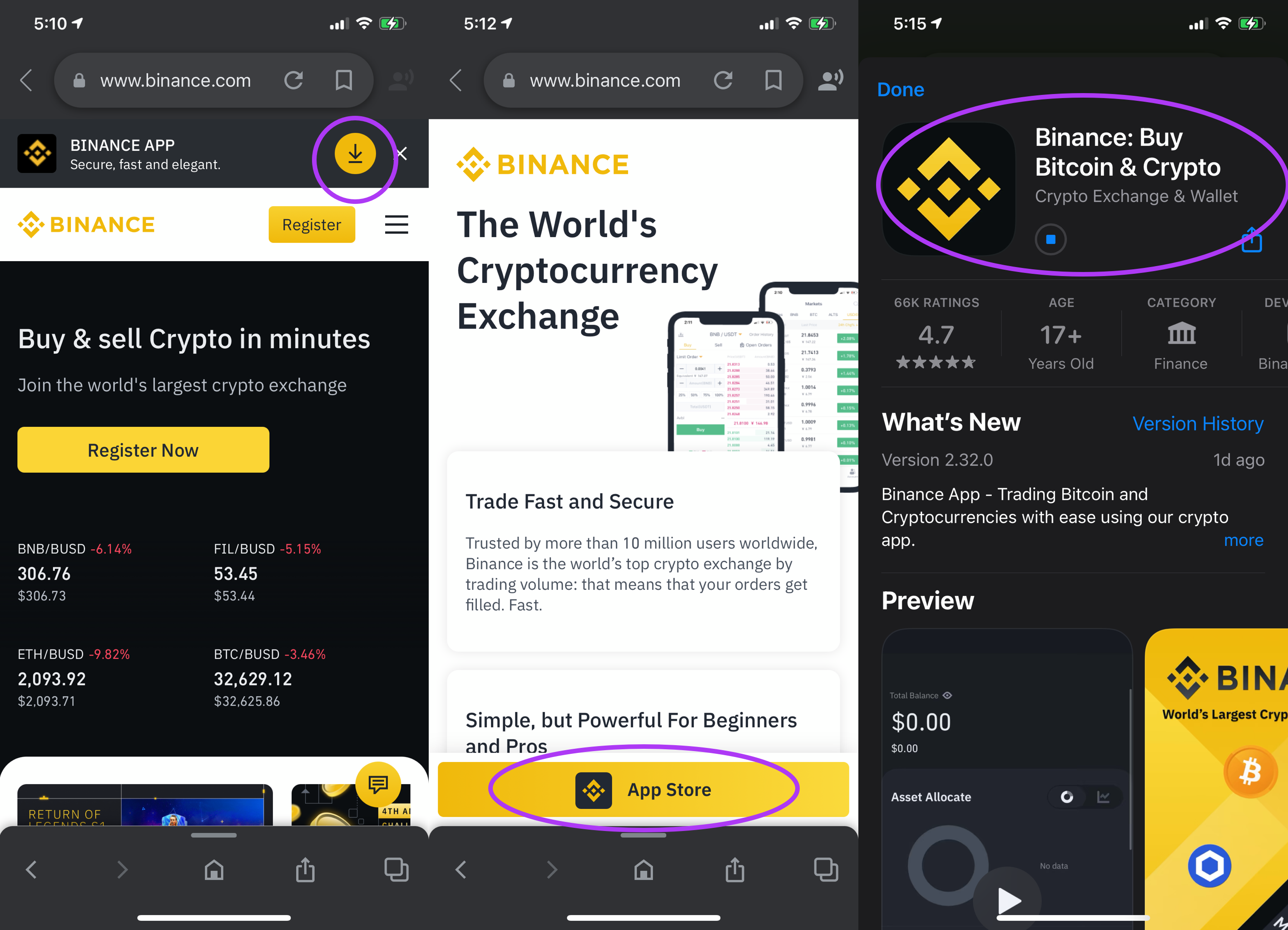
iOS users are advised to download the version from an overseas Apple Store. If you do not have an overseas Apple ID, please register one as soon as possible; it is an essential tool for the crypto world and a one-time effort. Squirrel has a tutorial: Register a US Apple ID in 8 minutes
Step 3: Mobile App: Identity Verification
The following operations will be performed on your phone. Users need to connect their VPN to South Korea, Japan, or Singapore (any location other than the US). Download from the Squirrel VPN official website; new users get a 3-day free trial.
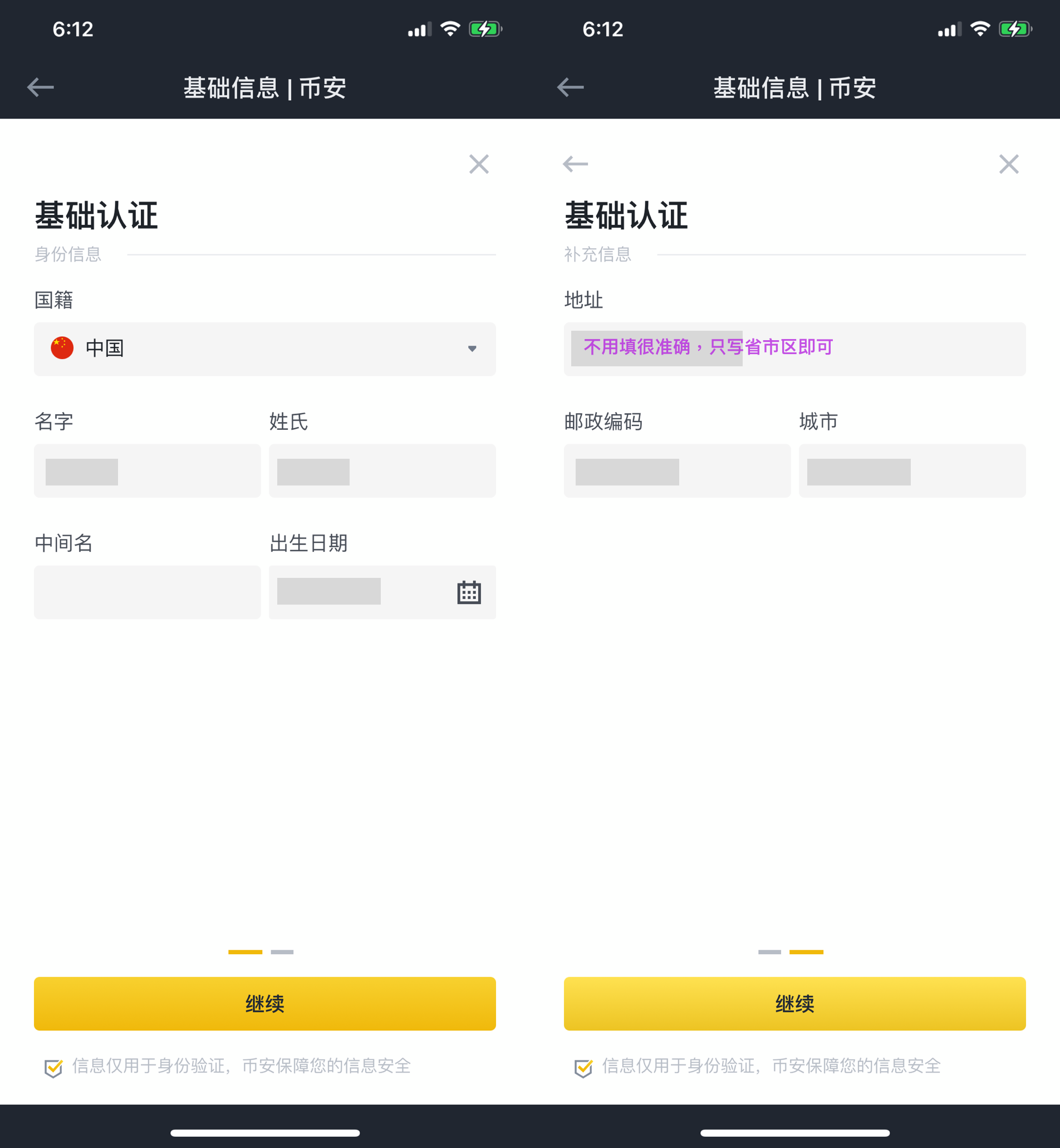
To purchase cryptocurrency with fiat, identity verification is required. You will need to: bind your phone number, email, Google Authenticator, fill in personal information, and upload your ID (not required for basic verification). These are necessary procedures, so you can proceed with confidence.
Open the app and log in to the account you just registered. If prompted to bind an email or Google Authenticator, it is recommended to follow the instructions.
After logging in, click "Verify" and follow the prompts to enter your phone number for SMS verification.
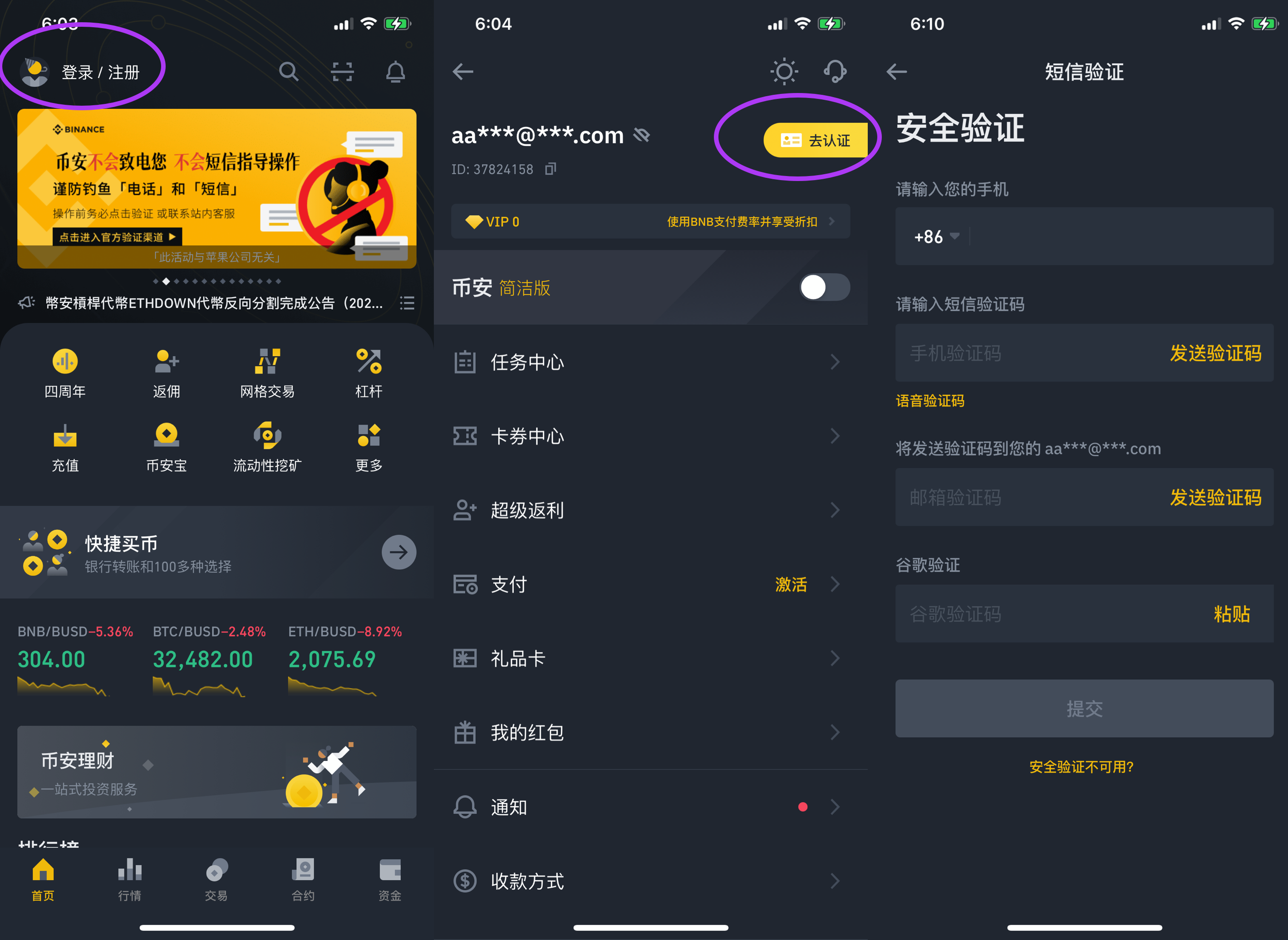
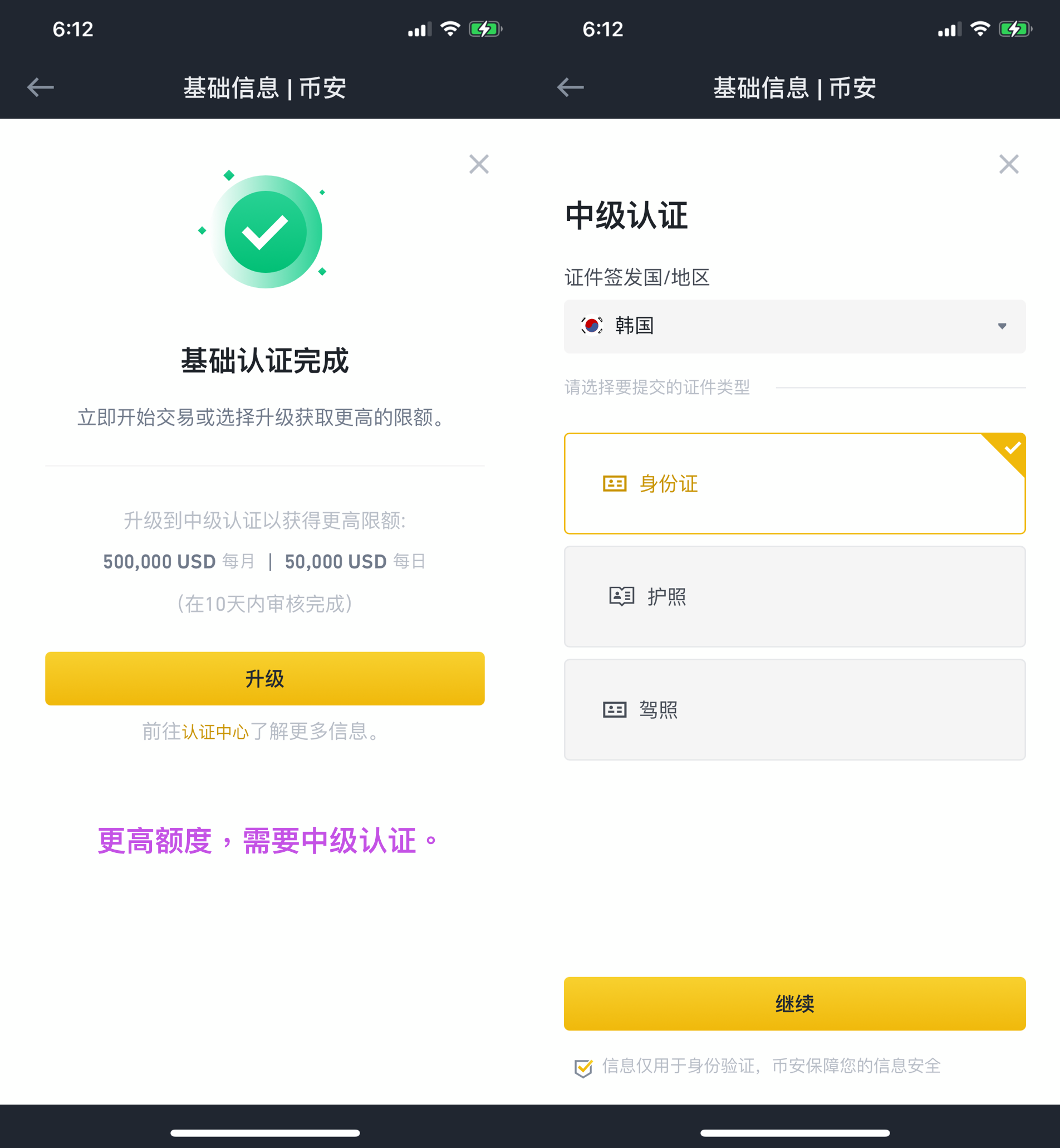
Continue to fill in your personal information for verification. If you need higher limits, you will need to perform intermediate verification, which requires uploading your ID card. Basic verification does not require an ID card.
Step 4: Mobile App: C2C Buying
Beginner's Note: On the three major exchanges, purchasing cryptocurrency with fiat is done via C2C (Customer-to-Customer), meaning you buy from individual sellers verified by the platform, not directly from the platform itself. The platform acts as an intermediary, providing guarantees and oversight. Sellers are required to provide security deposits and undergo rigorous verification, so you can buy with peace of mind.
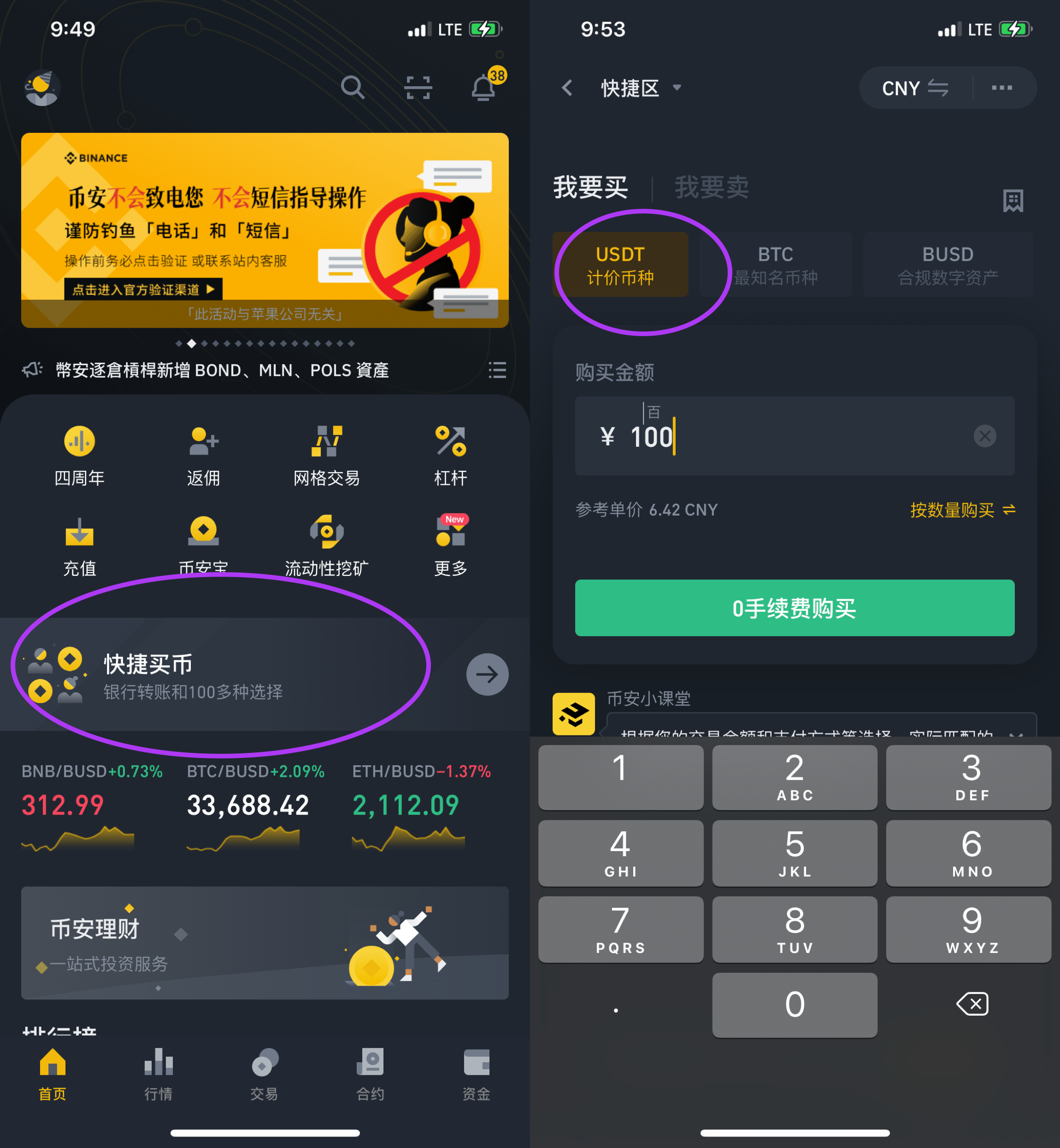
Return to the Binance homepage and click "P2P Trading" (or "Buy with Cash").
Taking USDT as an example, let's buy 100 RMB. Any of the three currencies recommended by Binance are fine; if it's your first time, buying USDT or BTC is a safe bet.
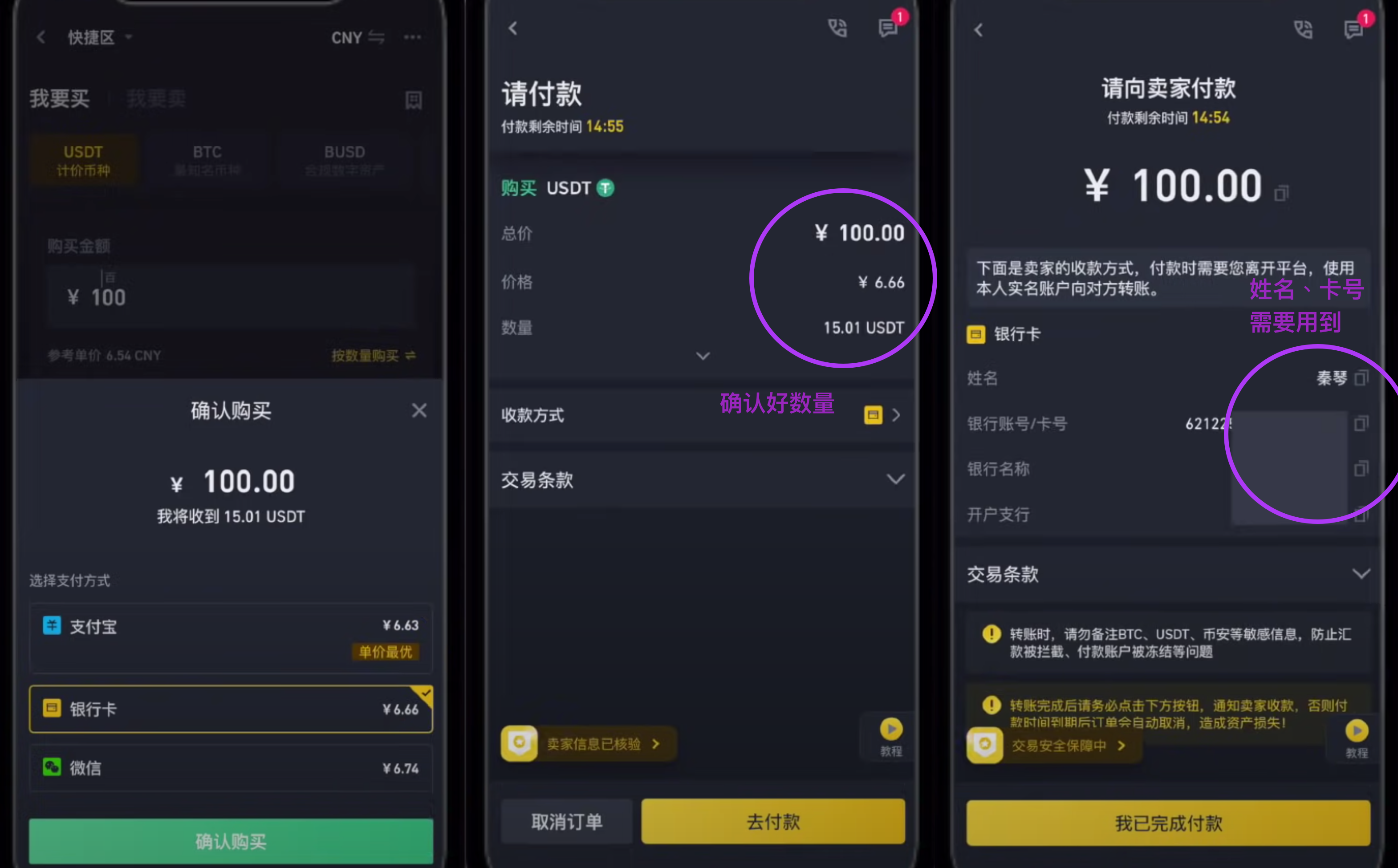
Select your payment method. After choosing "Bank Card," confirm the amount. On the merchant information page, you only need the name and bank card number.
Step 5: Online Banking: Payment to Merchant
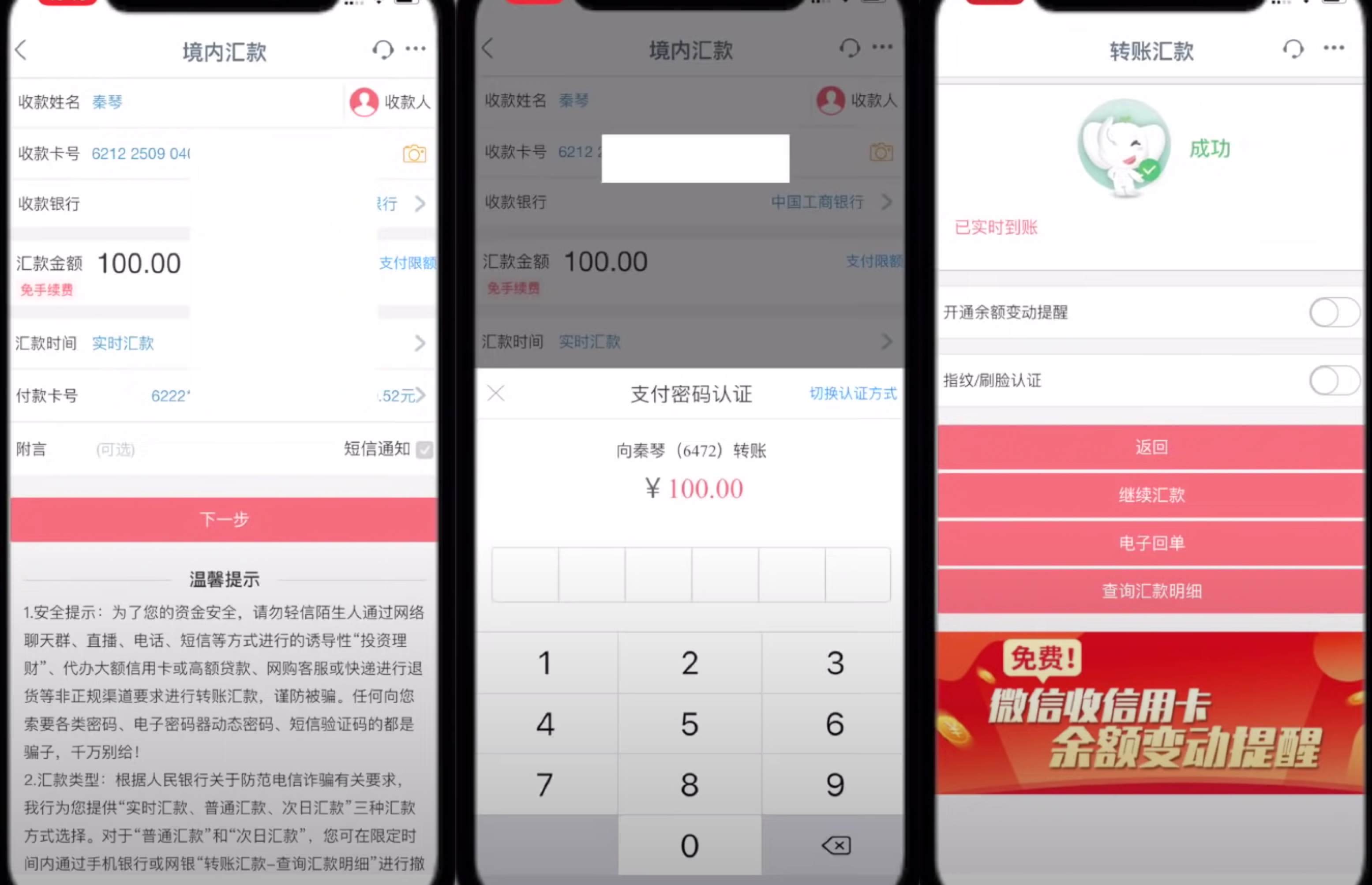
Open your preferred online banking app (e.g., ICBC) and start the transfer to the merchant. Copy and paste the merchant's name and bank card number from Binance.
Attention!: Do not write keywords like "USDT," "Cryptocurrency," or "Binance" in the transfer memo/remarks. You can leave it blank. Binance verifies these merchants, so you can pay with confidence.
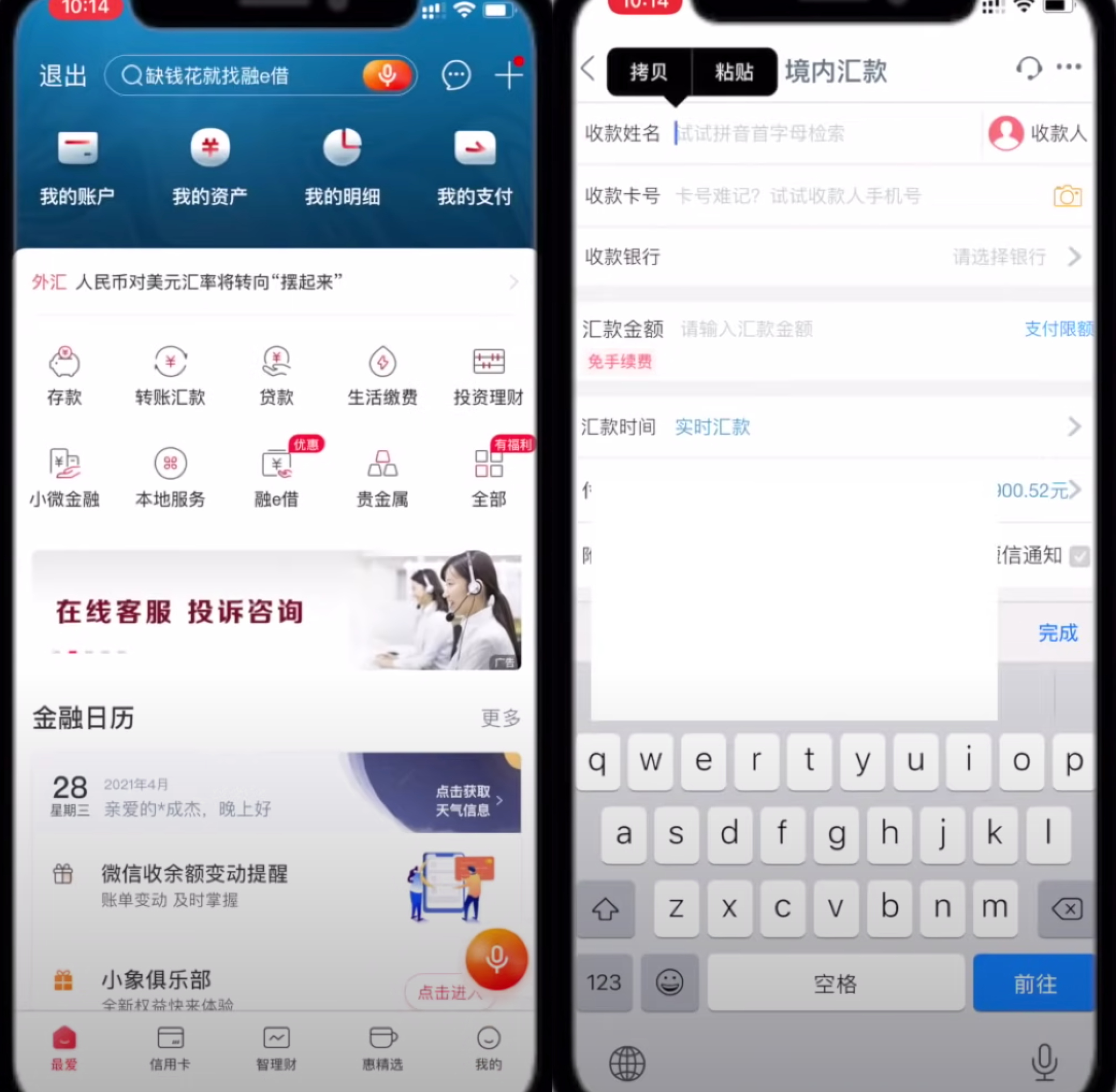
Enter your payment password. Payment successful! Attention!: Do not write keywords like "USDT," "Cryptocurrency," or "Binance" in the transfer memo/remarks. You can leave it blank. Binance verifies these merchants, so you can pay with confidence.
Step 6: Return to Binance: Confirm Receipt
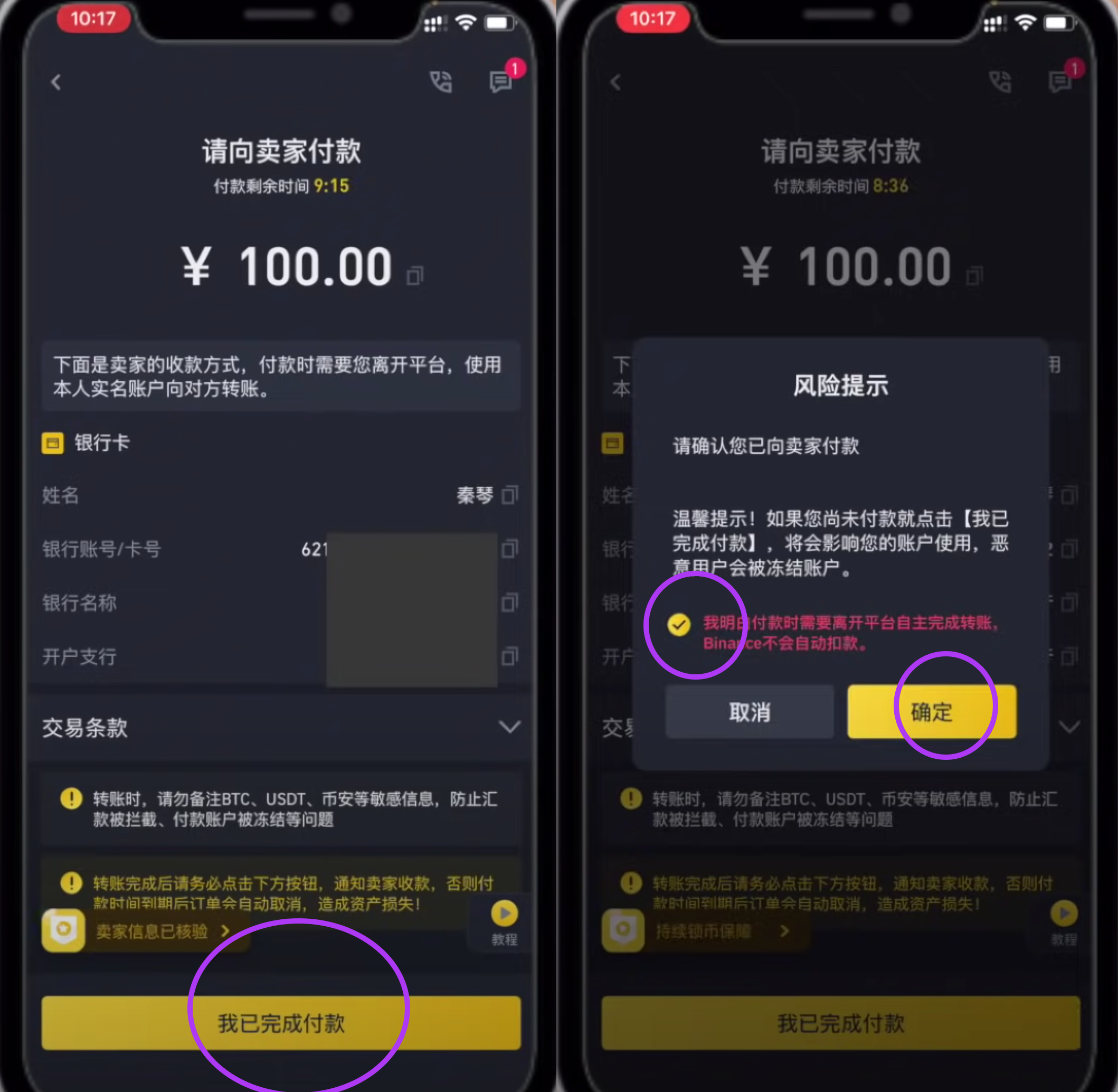
Return to Binance and click "Transferred, notify seller." Attention!: Ensure you have already made the payment via your online bank (Step 4). Binance will not automatically deduct the funds.
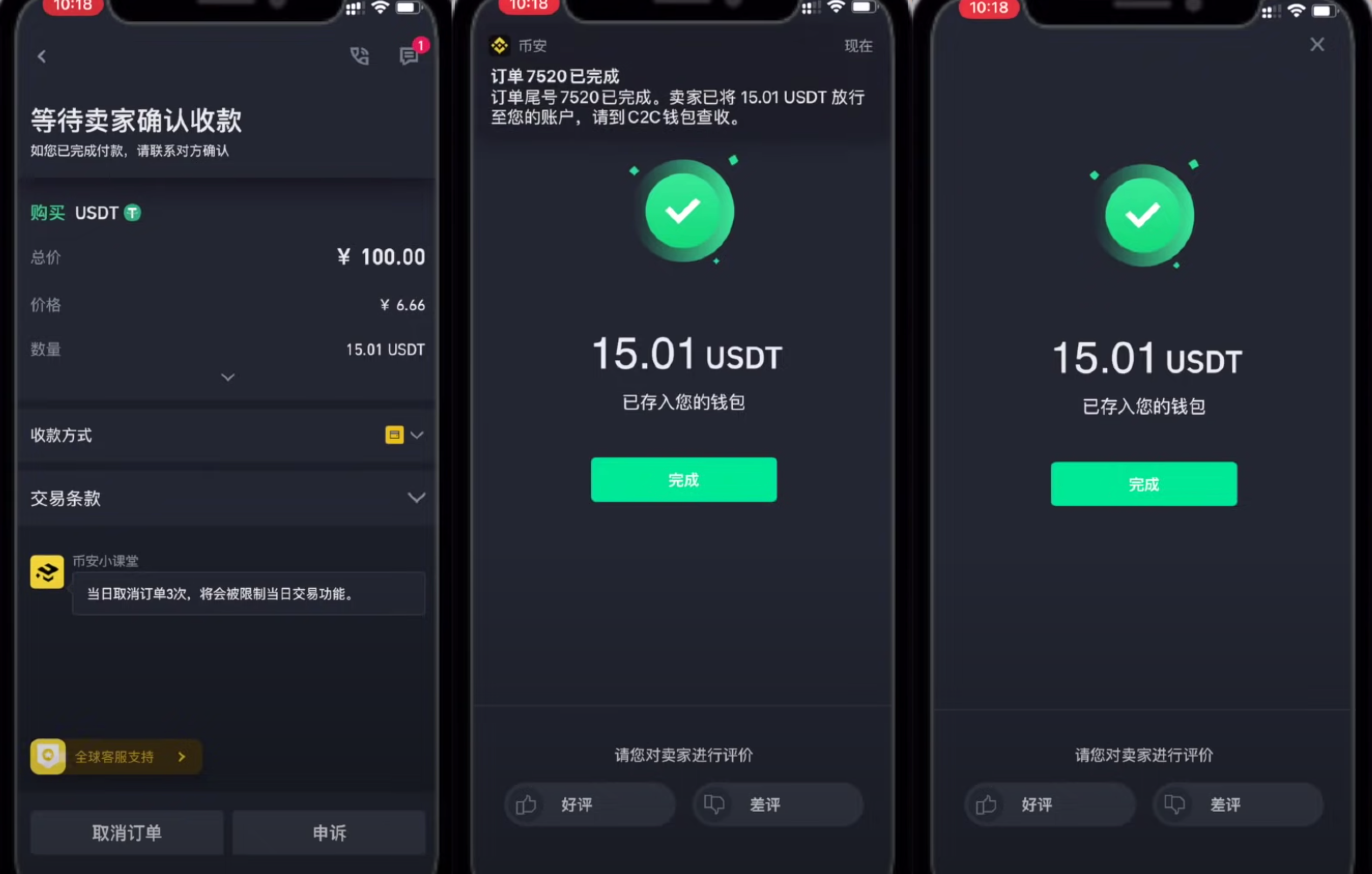
Wait for the seller to confirm receipt. This usually takes less than 5 minutes. If it times out, you can file an appeal. Generally, within 2 minutes, it will show as successful, and the purchased USDT will be in your account.
Step 7: Transfer to Spot Account
Every Binance account has multiple internal sub-accounts such as "Spot," "Margin," and "C2C." The USDT you just bought is located in your C2C sub-account. If you need to use this USDT, you must transfer it to another sub-account.
Click "Done" from the previous step. Or go to the "Wallets" main menu, select the "Funding" tab, and you will see the USDT you just bought.
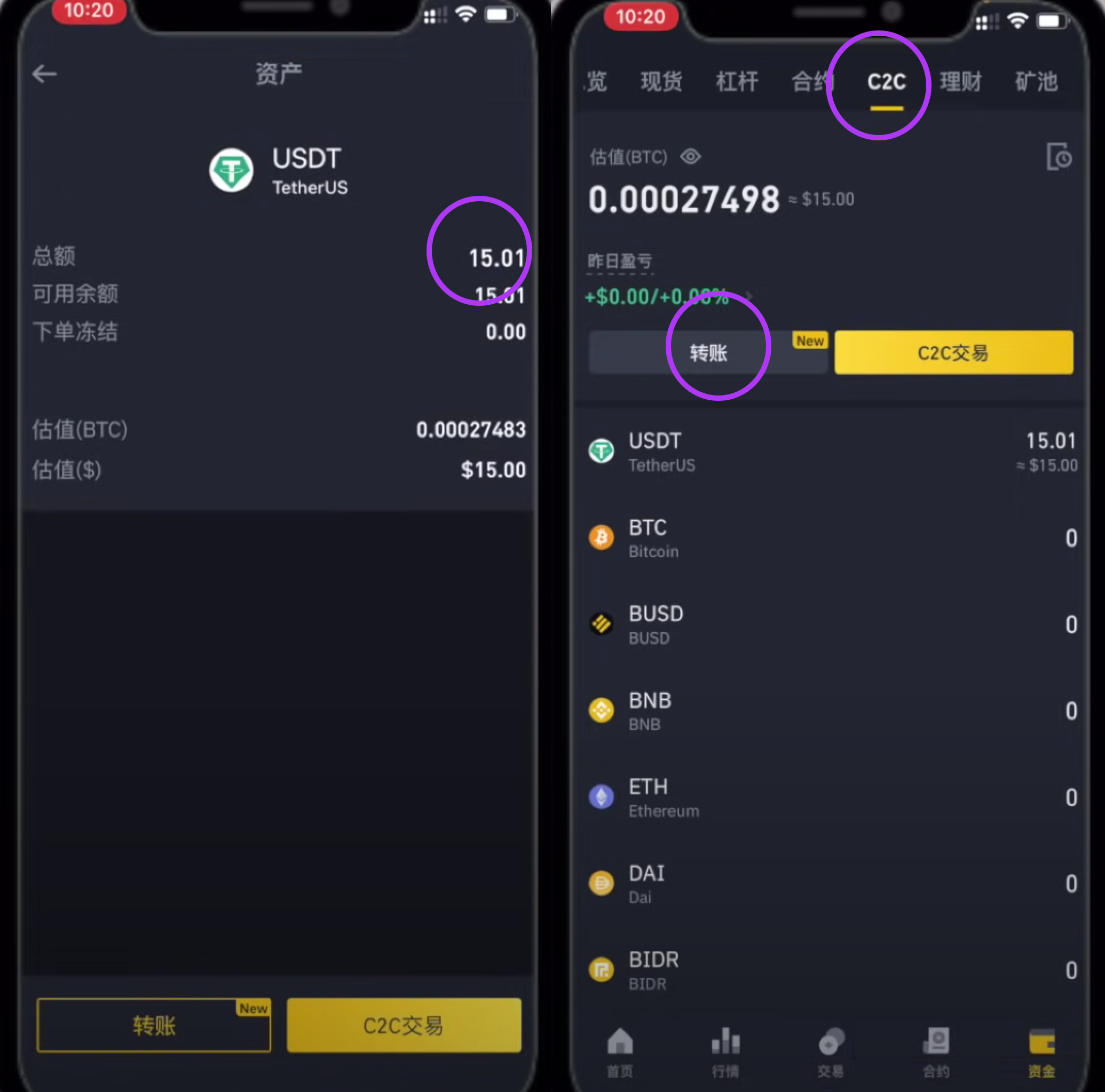
Select "Transfer" to move the required USDT to your Spot account. The Spot account allows you to perform spot trading, buy other cryptocurrencies, or transfer to other wallet addresses (e.g., for purchasing services). To use cryptocurrency to purchase Squirrel services, you need to have the funds in your Spot account.
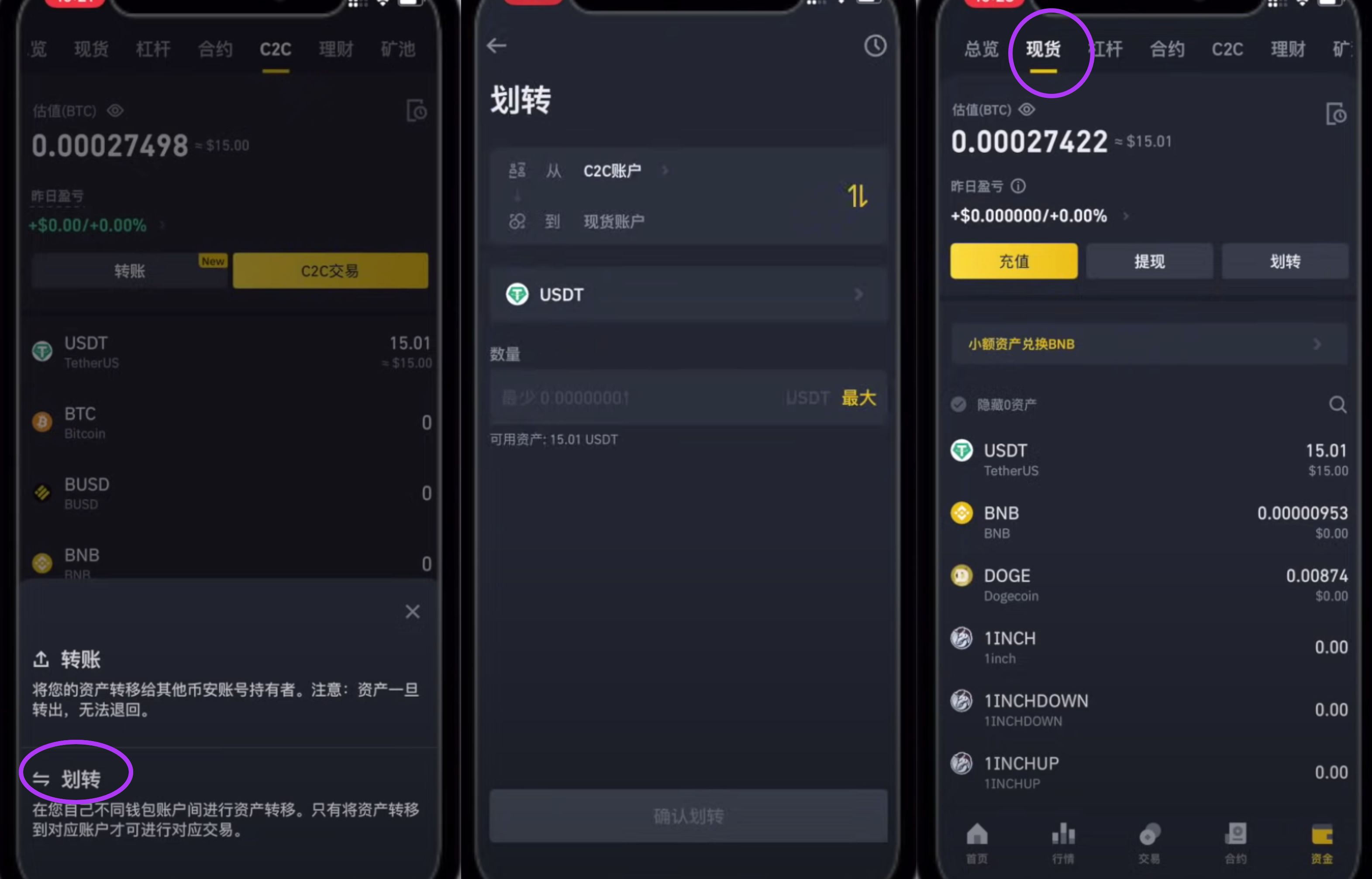
Done! You now have USDT on Binance and can trade other cryptocurrencies or transfer funds to other wallet addresses.
Other Articles:
Using Cryptocurrency to Purchase Squirrel VPN Register a US Apple ID in 8 minutes - 2022 Switching Apple Store Regions in 1 minute Squirrel VPN FAQ
Squirrel Official Website Backup Official Website (No VPN required)