[Tutorial] Squirrel VPN FAQ
![[Tutorial] Squirrel VPN FAQ](https://devcdn.pseo.one/694b8c5feb29738fb9516944/694b8c5fd1cc3dd4fcb00fe5/tutorial-squirrel-vpn-faq/cover-user-manual-faq.png)
[Tutorial] SquirrelVPN FAQ
Tutorial Content:
SquirrelVPN - Frequently Asked Questions and Answers.
How to download and purchase SquirrelVPN?
Please visit:
Squirrel Official Website or Backup Website (No VPN required) to download and purchase. First, download and install the Squirrel client, register a Squirrel account, and then proceed to the official website to make a payment.
Slow speed or lag after connecting to VPN
Please try the following recommended user routes:
Telecom users: USA/South Korea Unicom & Mobile users: Singapore/Japan/Taiwan/USA/UK/Netherlands (For security reasons, all Hong Kong nodes have been removed.)
It is known that Great Wall Broadband is extremely slow when using a VPN and is not recommended. Overall speed: Unicom > Mobile > Telecom.
Extremely slow speed, almost unusable, or severe lag
You can try these steps in order:
- Try changing the country, following the recommended routes above.
- Restart the SquirrelVPN App.
- Turn off Wi-Fi and try using mobile data. If the VPN speed is fine on 4G, the issue is with your Wi-Fi; please restart your router. Many users find it speeds up after restarting the router, possibly because they were removed from a previous speed-limiting list.
- Try a different Wi-Fi network; it really can make a difference. Some users find their home network is slow no matter how they adjust it, but it works perfectly at the office.
Mobile: App won't open, displays:
"Error in find web server" or "No proxy server found in this country"
If the app won't open, it means the local network is poor and couldn't find a Squirrel node. You can exit the app and try opening it multiple times. If it still doesn't open, please turn off Wi-Fi and use mobile data to open the app. It will definitely open on mobile data; you can turn Wi-Fi back on once connected.
Mobile: VPN connects but immediately disconnects, or still cannot access the internet
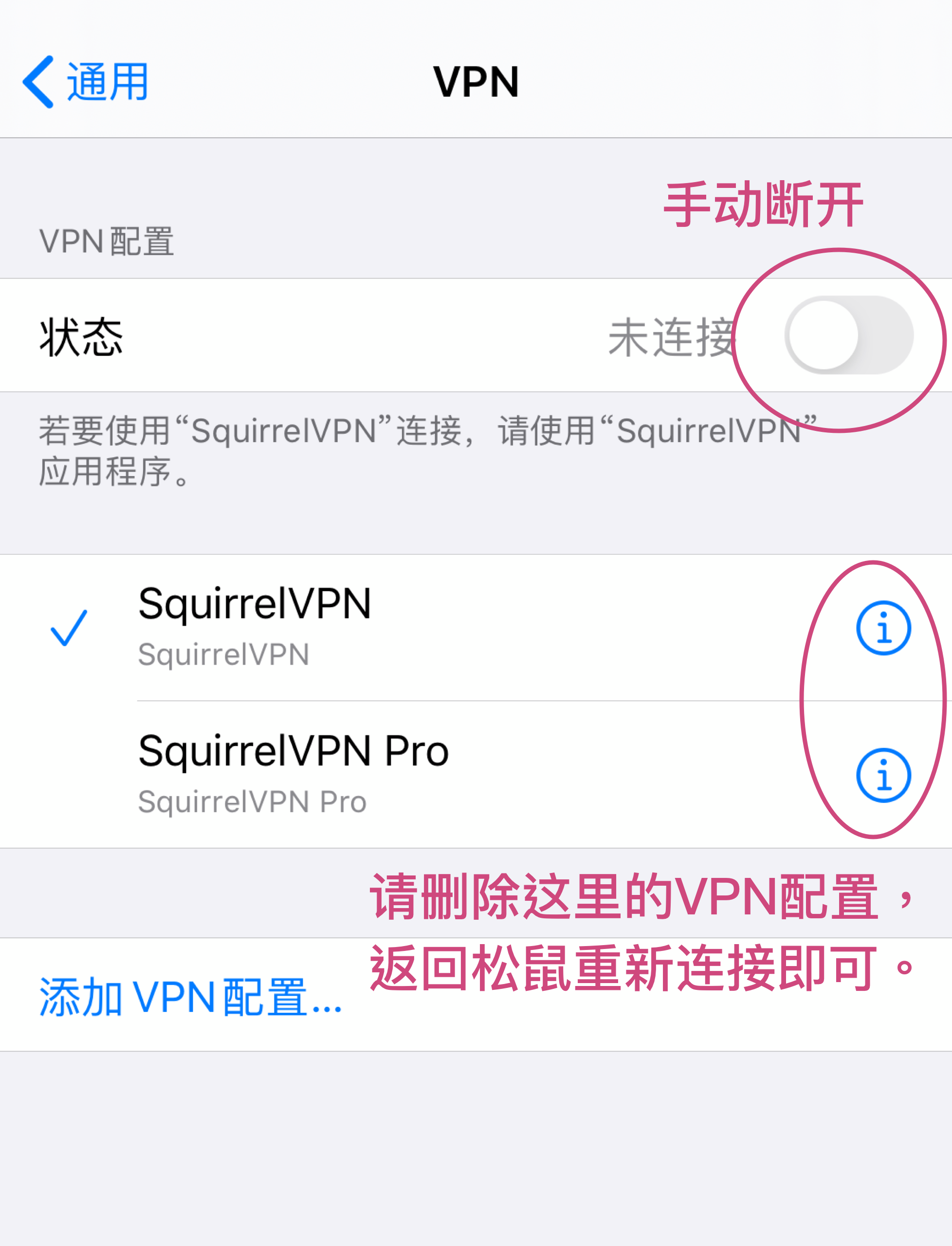
On iOS, if you connect to Squirrel, return to the home screen, and then re-enter the app to find the connection has automatically dropped and you cannot access the internet:
Solution:
Clear your phone settings. Open your phone's System Settings -> VPN, manually adjust it to the disconnected state, and clear the settings. Return to Squirrel and try connecting again.
For daily use, always operate within the Squirrel app; do not operate via the system settings.
PC: VPN shows connected, but still cannot access the internet
The cause may be a conflict; please try:
- Browser setting conflicts. Try a different browser; the current one might have default proxy settings or plugins causing a conflict. You can check Browser > Proxy settings. Disable plugins like "unblock Youku", "clashX", etc.
- You may have installed other VPNs or similar services that are causing conflicts. Turn off or uninstall other VPNs.
- System setting conflicts.
MacOS: Disconnect Squirrel, open System Settings -> Network -> Wi-Fi -> Advanced -> Proxies -> Uncheck all boxes -> OK, then reconnect to Squirrel and try again.
Windows: Disconnect Squirrel, open Start -> Settings -> Network & Internet -> Proxy -> Turn off all proxies, ensure no boxes are checked -> OK, then reconnect to Squirrel and try again.
How to configure Telegram?
macOS/Windows:
You need to configure a SOCKS5 proxy in Telegram:
IP: 127.0.0.1 Port: 12377
How many devices are supported? What if I exceed the limit?
It supports 3 simultaneous logins. If you exceed 3 devices, logging in on a new device will automatically kick off an old one. You can also manually click "Log out" to sign out of old devices you no longer use.
Why can't I access a certain foreign website even after connecting to the VPN?
Please turn on Global Mode.
Mobile: Tap Me > Settings, then turn on Global Mode. Note: Reconnect the VPN to activate Global Mode.
PC: Open the menu and click "Global mode".
- Global Mode: All network requests go through the VPN. Even when you visit Taobao or Baidu, it goes through the VPN. If Global Mode is on, domestic websites may be slower because the traffic is routed through the VPN to a foreign server first.
- Auto Mode: Only websites that require a VPN will use it (i.e., those on the GFW list). This list is updated manually by our server.
Is Netflix supported?
The US node can be used for Netflix. Netflix movies have different copyrights in different countries/regions. Providing a VPN for users to watch Netflix across borders is strictly speaking an infringement of copyright.
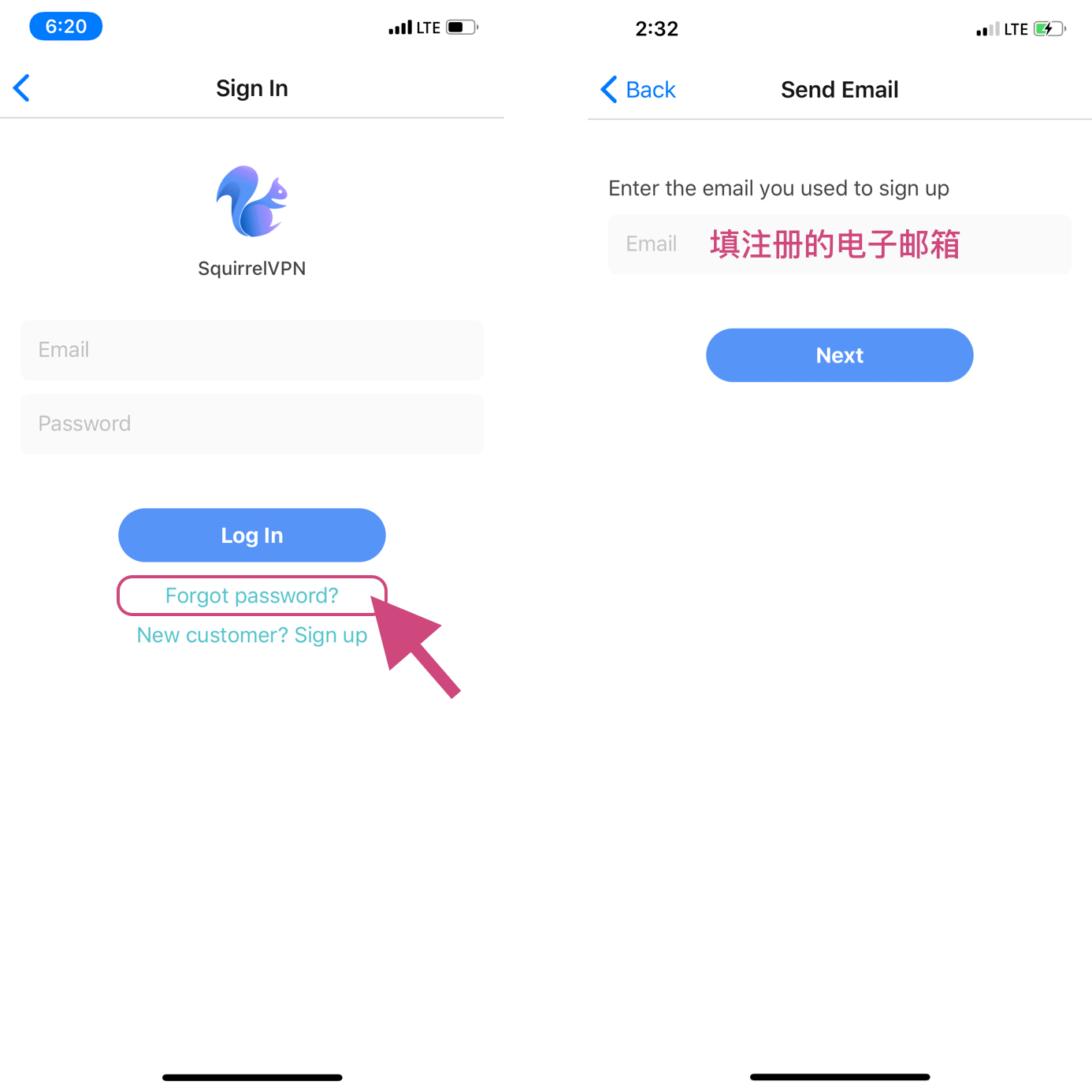
Forgot password? How to reset it?
On the mobile login page, click the "Forget password?" link, then enter your account's email address.
Is 32-bit system or macOS 10.11/10.12 supported?
We are very sorry, but these are currently not supported.
Squirrel currently supports: Windows 7+, 64-bit only; macOS 10.14 and above; Linux systems, supports Ubuntu 16+, others not verified.