【教程】松鼠VPN常见问题FAQ

N
Natalie Ferreira

Consumer Privacy & Identity Theft Prevention Writer

 
2026年3月4日 4 分钟阅读
【教程】松鼠VPN常见问题FAQ

【教程】松鼠VPN常见问题FAQ

教程内容:

松鼠VPN-常见问题与解答。


松鼠VPN, 如何下载,如何购买?

请前往:

松鼠官网备用官网(无需翻墙) 进行下载和购买。 先下载安装松鼠客户端,并注册松鼠账户,再在官网进行购买缴费。


VPN连接后,速度慢,卡顿

请尝试以下用户线路推荐:

电信用户:美国/韩国 联通 & 移动用户:新加坡/日本/台湾/美国/英国/荷兰 (安全起见,香港节点全部下架了)

已知长城公司的宽带使用VPN极慢,不建议使用。 总体速度:联通 > 移动 > 电信。


VPN连接后,速度极慢,几乎无法使用,卡顿严重

您可以尝试,按顺序依次:

  1. 更换国家试试看,按照以上用户推荐线路选择。
  2. 重启松鼠VPN App。
  3. 关掉Wi-Fi,用手机流量试试。如果手机4g用VPN速度可以,那就是Wi-Fi的问题,请重启路由器。 很多用户重启路由器后就快了,可能是从之前的限速列表里移出了。
  4. 换一个Wi-Fi试试,真的会不同。有的用户就是家里怎么调试都特别慢,换到公司就飞快。

手机端:App进不去,显示:

“Error in find web server”或”No proxy server found in this country”

App打不开就是本地网络不太好,没找到松鼠的节点。 可以退出app,多次尝试打开。 如果还是打不开,请关闭Wi-Fi用手机流量打开app,手机流量肯定可以打开,使用时再开Wi-Fi。


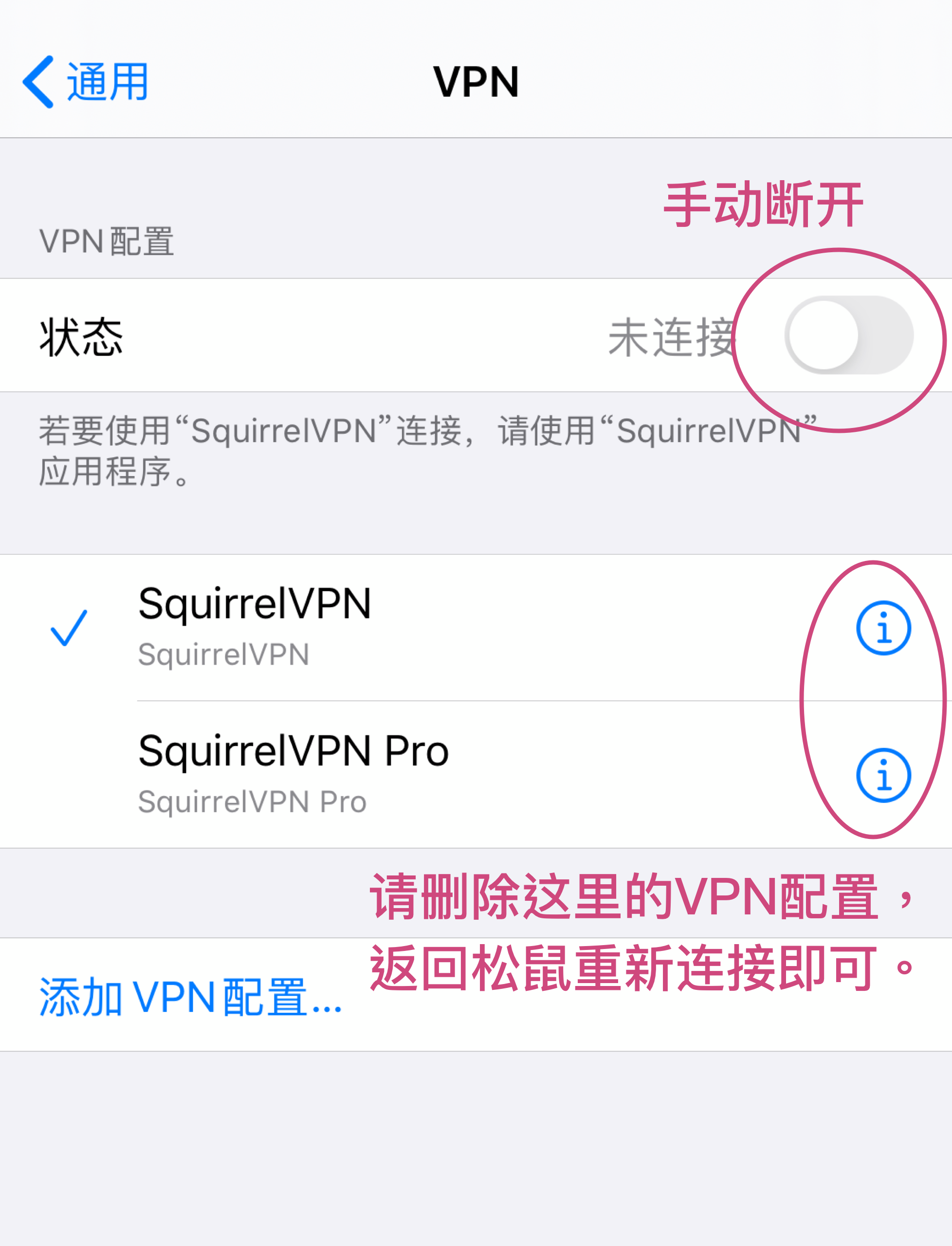
手机端:VPN连接了,马上又断掉,还是上不了网

iOS系统,连上松鼠返回桌面,再进入App发现连接自动断掉,无法上网。

解决办法:

清理一下手机设置就好了。 打开手机的系统设置->VPN,手动调整到未连接状态,并把设置清除一下。回到松鼠,再连接就好了。

平时使用还是在松鼠app里操作,不要在系统里操作。

电脑端:VPN显示连接了,但还是上不了网

原因可能是产生了冲突,请尝试:

  1. 浏览器设置冲突。换个浏览器,可能是现在的浏览器里有默认的代理设置或插件,产生了冲突。您可以查看浏览器> Proxy设置。并关闭unblock优酷,clashX等插件。
  2. 可能您安装过其他VPN或者类似服务,产生了有冲突。把其他VPN关掉或者卸载。
  3. 系统设置冲突。

MacOS:断开松鼠,打开系统设置–》网络–》Wi-Fi-》高级-》代理-》不要勾选任何框-》确定,再连上松鼠,试试看。

Windows:断开松鼠,打开 开始–》设置–》网络和互联网–》代理–》关掉所有代理,不要勾选任何框-》确定,再连上松鼠,试试看。


Telegram电报如何配置?

macOS/Windows:

需要在电报里配置SOCKS5代理:

IP: 127.0.0.1 端口: 12377


支持几台设备? 超过了怎么办?

支持3台设备同时登录。 如果超过3台,新设备登录,会自动踢掉一台旧设备。您也可以手动点击“Log out”,登出不想使用的旧设备。


为什么连上了VPN,还是访问不了某个国外网站?

请打开全局模式。

手机端:点击Me > Settings, 然后打开Global Mode。注意重新连接VPN以激活全局模式。

电脑端: 打开菜单,点击”Global mode”。

全局模式:所有网络请求都经过VPN,您访问淘宝、百度也都是通过VPN来访问的,如果开了全局,访问国内网站就会比较慢,因为要走VPN到国外走一圈;

自动模式:需要翻墙的网站才走VPN,也就是在GFW列表中才会走VPN,这个列表需要咱们服务端手动更新。


Netflix奈飞/网飞,可以支持么?

美国节点可以使用Netflix。 Netflix电影在不同国家/地区拥有不同的版权,为用户提供VPN跨国家观看Netflix严格来说是非法侵权的。


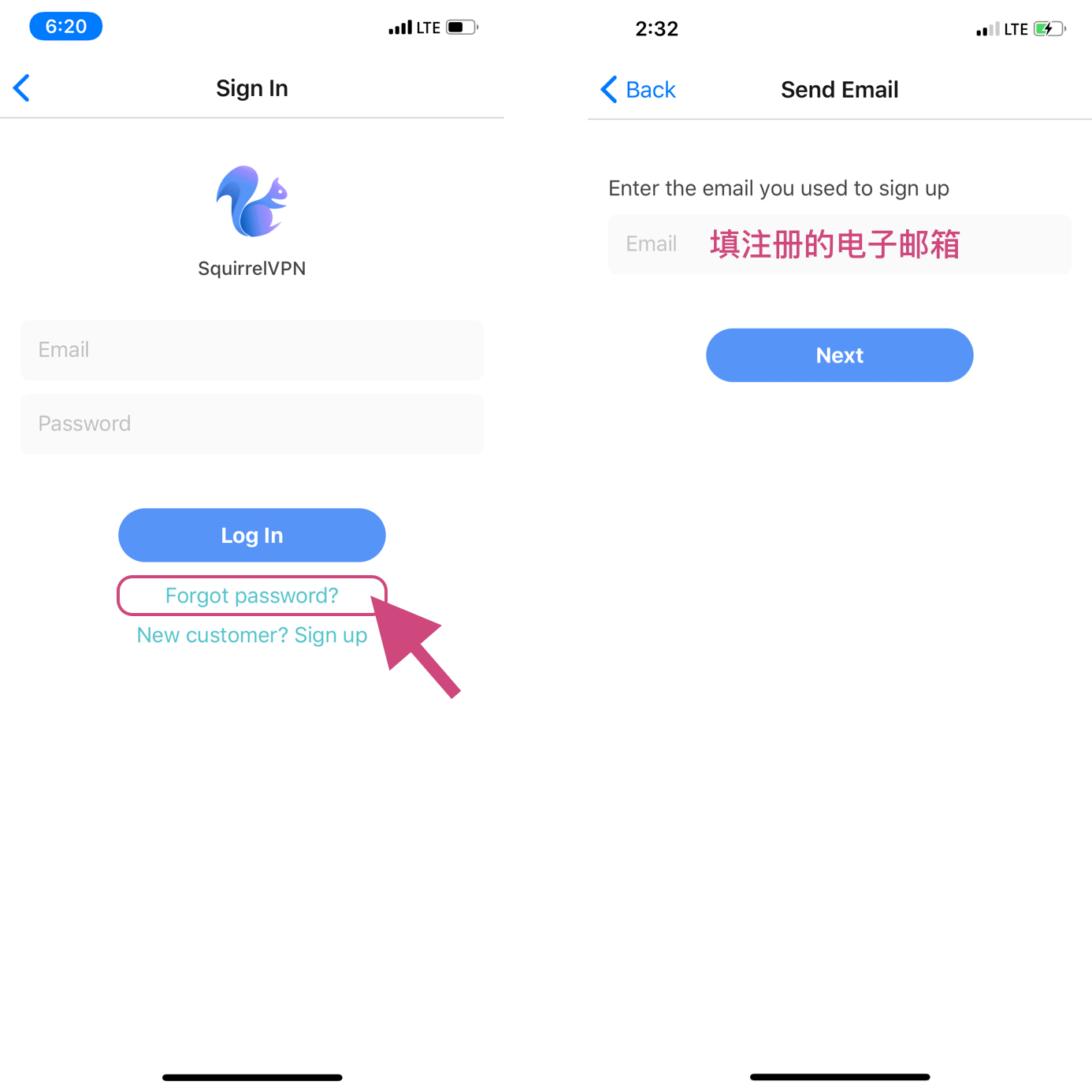
忘记密码怎么办?如何重置密码?

手机端登录页面,点击“Forget password?”链接,然后输入您账号的电子邮箱。

可以支持32位系统、macOS 10.11/10.12么?

非常抱歉,目前不支持呢。

松鼠目前支持: windows7+,仅限64位; macOS 10.14以上; Linux系统,支持Ubuntu 16+, 其他未验证。

N
Natalie Ferreira

Consumer Privacy & Identity Theft Prevention Writer


Natalie Ferreira is a consumer technology writer who specializes in identity theft prevention, online safety, and digital literacy. After experiencing identity theft firsthand, she dedicated her career to educating the public about personal data protection. Natalie has written for major consumer technology outlets and holds a degree in Journalism from Columbia University. She focuses on making cybersecurity approachable for families, seniors, and first-time internet users who may feel overwhelmed by the technical jargon.

相关文章

Decentralized Tunneling Protocols and P2P Onion Routing Architecture
Decentralized Tunneling Protocol

Decentralized Tunneling Protocols and P2P Onion Routing Architecture

Explore the architecture of p2p onion routing and decentralized tunneling protocols. Learn how web3 vpn and depin are creating a new bandwidth marketplace.

作者 Daniel Richter 2026年3月20日 10 分钟阅读
common.read_full_article
Cryptographic Accounting for P2P Bandwidth Sharing Economy
P2P Bandwidth Sharing

Cryptographic Accounting for P2P Bandwidth Sharing Economy

Learn how blockchain and cryptographic accounting power the P2P bandwidth sharing economy in dVPNs and DePIN projects for secure data monetization.

作者 Viktor Sokolov 2026年3月20日 8 分钟阅读
common.read_full_article
Integration of Zero-Knowledge Proofs for Anonymous Node Authentication
Zero-Knowledge Proofs

Integration of Zero-Knowledge Proofs for Anonymous Node Authentication

Learn how Integration of Zero-Knowledge Proofs for Anonymous Node Authentication secures dVPN networks and protects bandwidth miners in the Web3 era.

作者 Marcus Chen 2026年3月20日 9 分钟阅读
common.read_full_article
Zero-Knowledge Proofs for Anonymous Node Validation
Zero-Knowledge Proofs

Zero-Knowledge Proofs for Anonymous Node Validation

Learn how Zero-Knowledge Proofs (ZKPs) enable anonymous node validation in decentralized VPNs (dVPN) and DePIN networks to protect provider privacy.

作者 Marcus Chen 2026年3月19日 7 分钟阅读
common.read_full_article