【튜토리얼】 암호화폐로 Squirrel VPN을 구매하는 방법

T
Tom Jefferson

CEO & Co-Founder

 
2026년 3월 4일 3 분 소요
【튜토리얼】 암호화폐로 Squirrel VPN을 구매하는 방법

【튜토리얼】 암호화폐로 Squirrel VPN 구매하는 방법

cover-buy-with-BTC

튜토리얼 내용:

지난 튜토리얼에 이어, 이미 USDT/BTC 현물을 보유하고 계신 상태에서 어떻게 암호화폐로 Squirrel VPN을 결제하는지 알아봅니다. 즉, 거래소에서 출금하여 Squirrel VPN으로 결제하는 방법입니다.

본 튜토리얼은 간단하고 효과적입니다. Squirrel에서 제작한 가이드이니 단계를 꼼꼼히 읽고 차근차근 따라 하시면 반드시 성공하실 수 있습니다. 함께 시작해 봅시다!


Step 1: Squirrel 구매 페이지 열기

다음 사이트로 이동하세요: Squirrel 공식 홈페이지 또는 대체 공식 홈페이지(VPN 불필요)에서 구매를 진행합니다.

구매하려는 플랜(1개월/6개월/1년)을 선택하세요. 결제 수단으로 "암호화폐(Cryptocurrency)"를 선택합니다.

주의: 아직 Squirrel 계정이 없다면, 먼저 Squirrel 모바일 앱을 다운로드하여 계정을 등록해야 합니다. 신규 사용자에게는 3일 무료 체험이 제공됩니다.
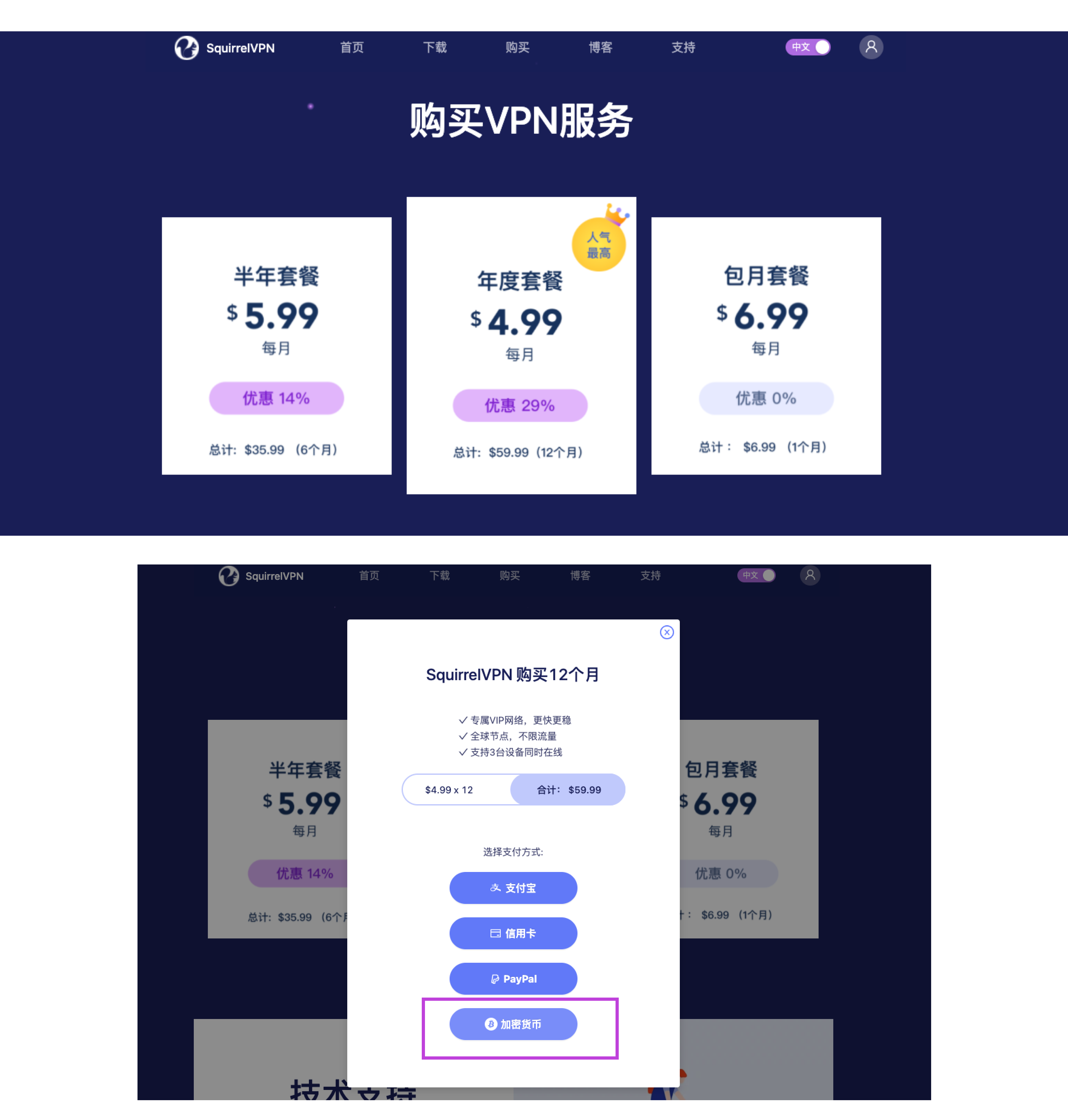
Step1: open crypto payment

Step1: open crypto payment


Step 2: 암호화폐 결제 페이지 열기

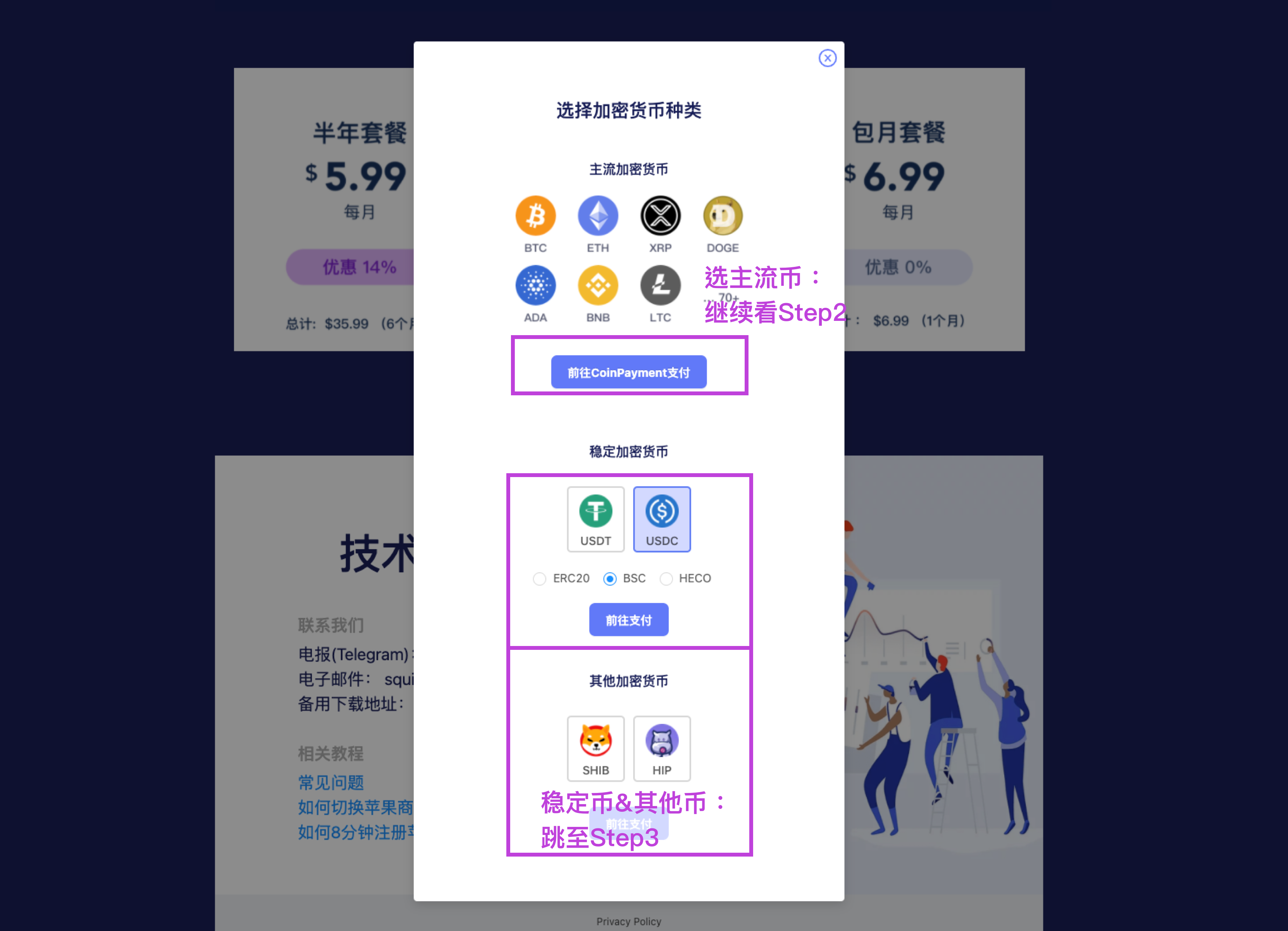
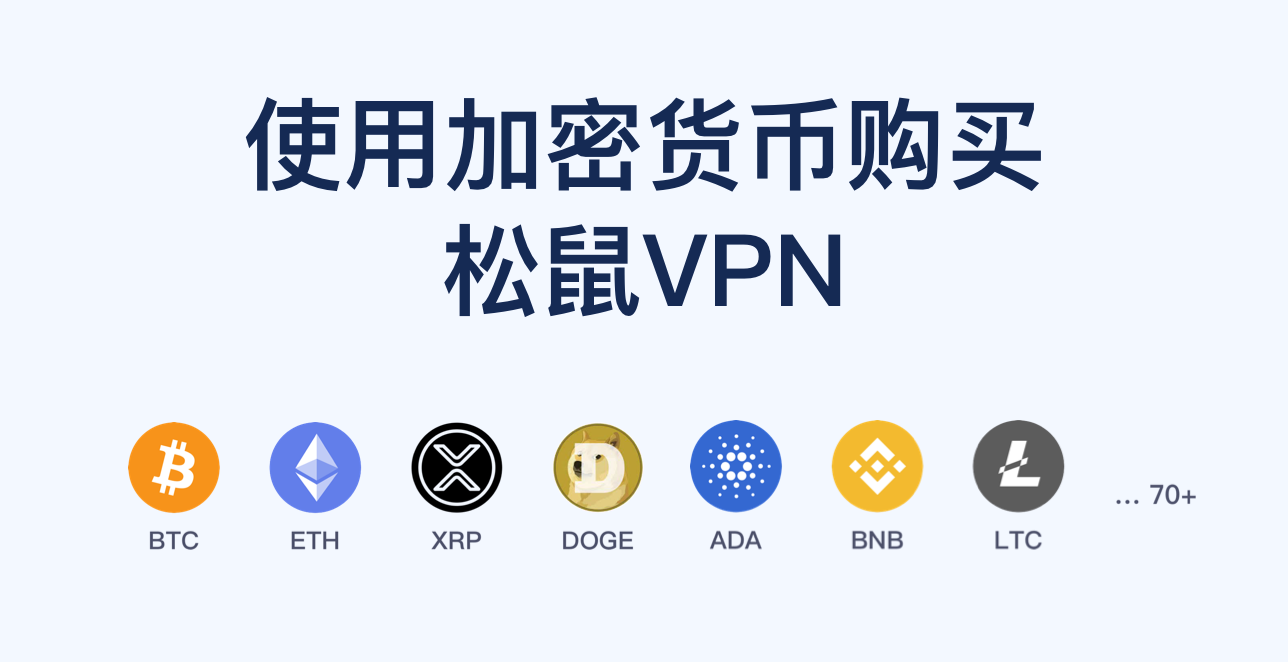
Squirrel은 70개 이상의 암호화폐를 지원하며, 주요 암호화폐는 대부분 결제가 가능합니다. 결제에 사용할 암호화폐를 선택하세요.

  1. 코인 종류를 선택합니다. USDT를 예로 들면 ERC20과 바이낸스 BSC 체인 두 가지가 있습니다. BSC는 수수료가 저렴하므로 USDT.BEP20을 선택하는 것이 좋습니다.

주의: 체인을 반드시 올바르게 선택해야 합니다! 결제 시 다시 한번 확인하세요.
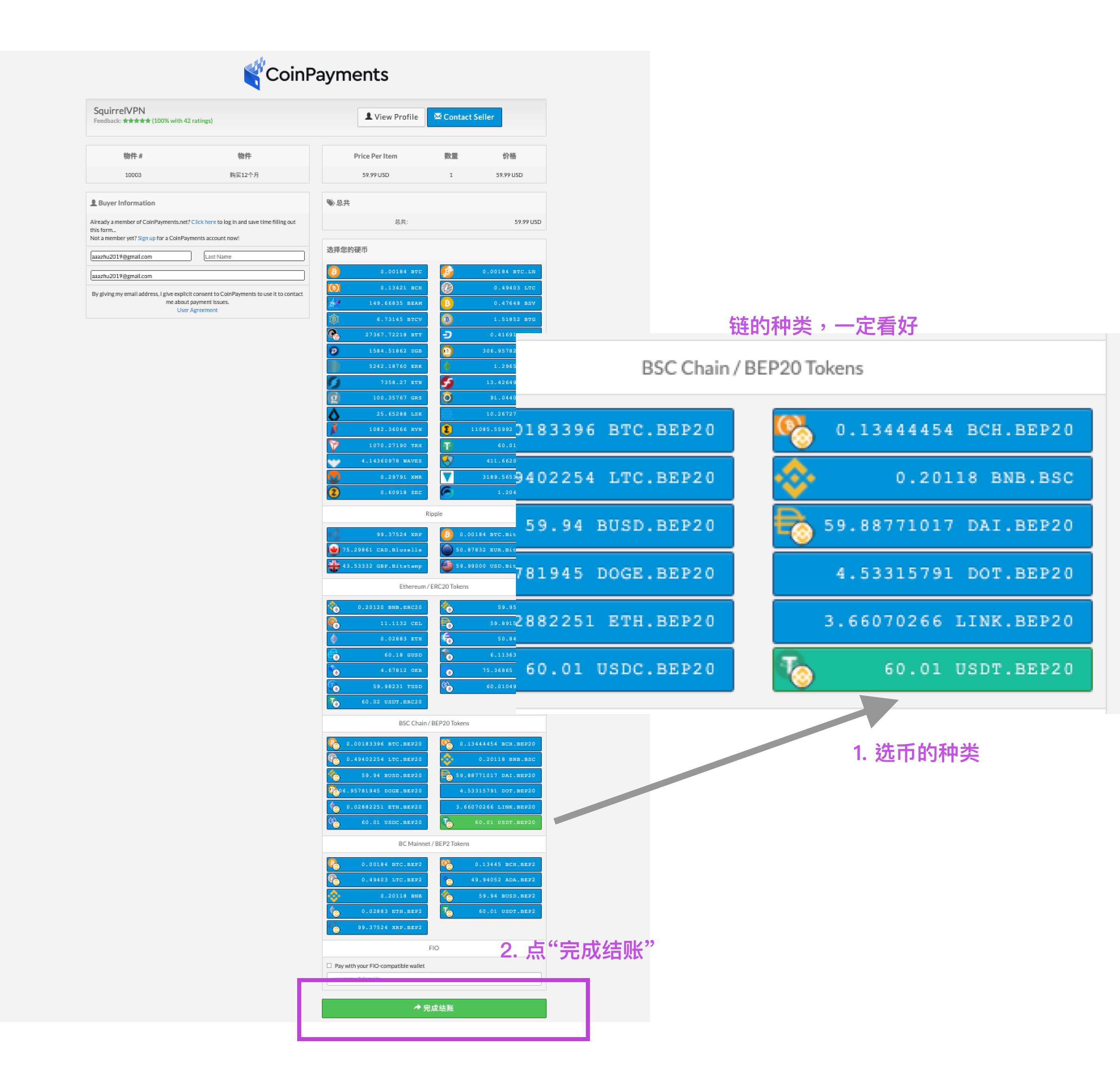
Step2: open crypto payment

  1. "결제 완료(Click to complete checkout)"를 클릭합니다.
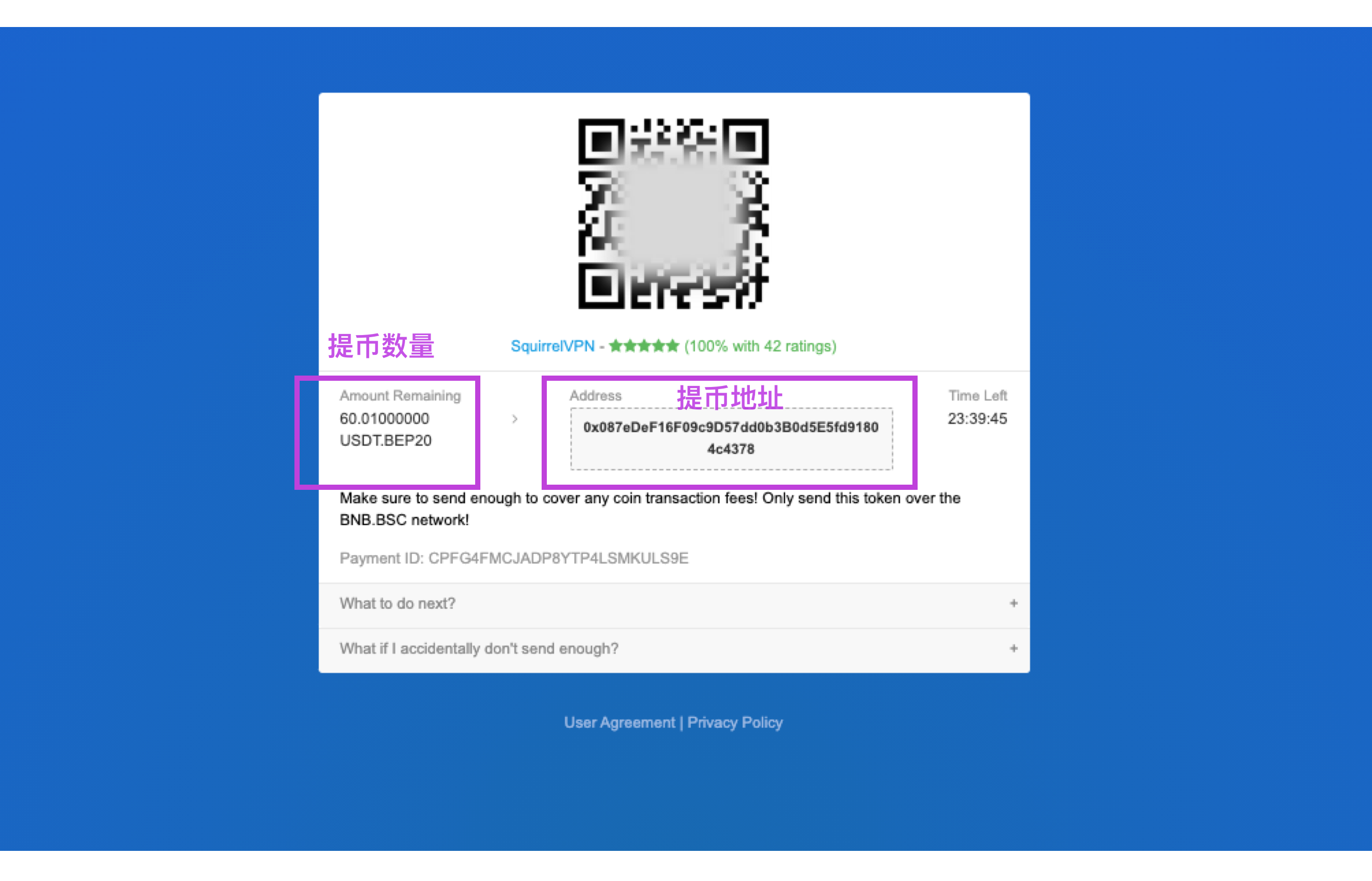
Step2: open QR


Step 3: 암호화폐 결제 페이지 확인

스테이블 코인 및 기타 암호화폐를 클릭하면 결제 페이지가 나타납니다.

주의: 체인 선택에 유의하세요! 결제 시 코인 종류와 체인 종류가 모두 정확한지 다시 한번 확인하시기 바랍니다.
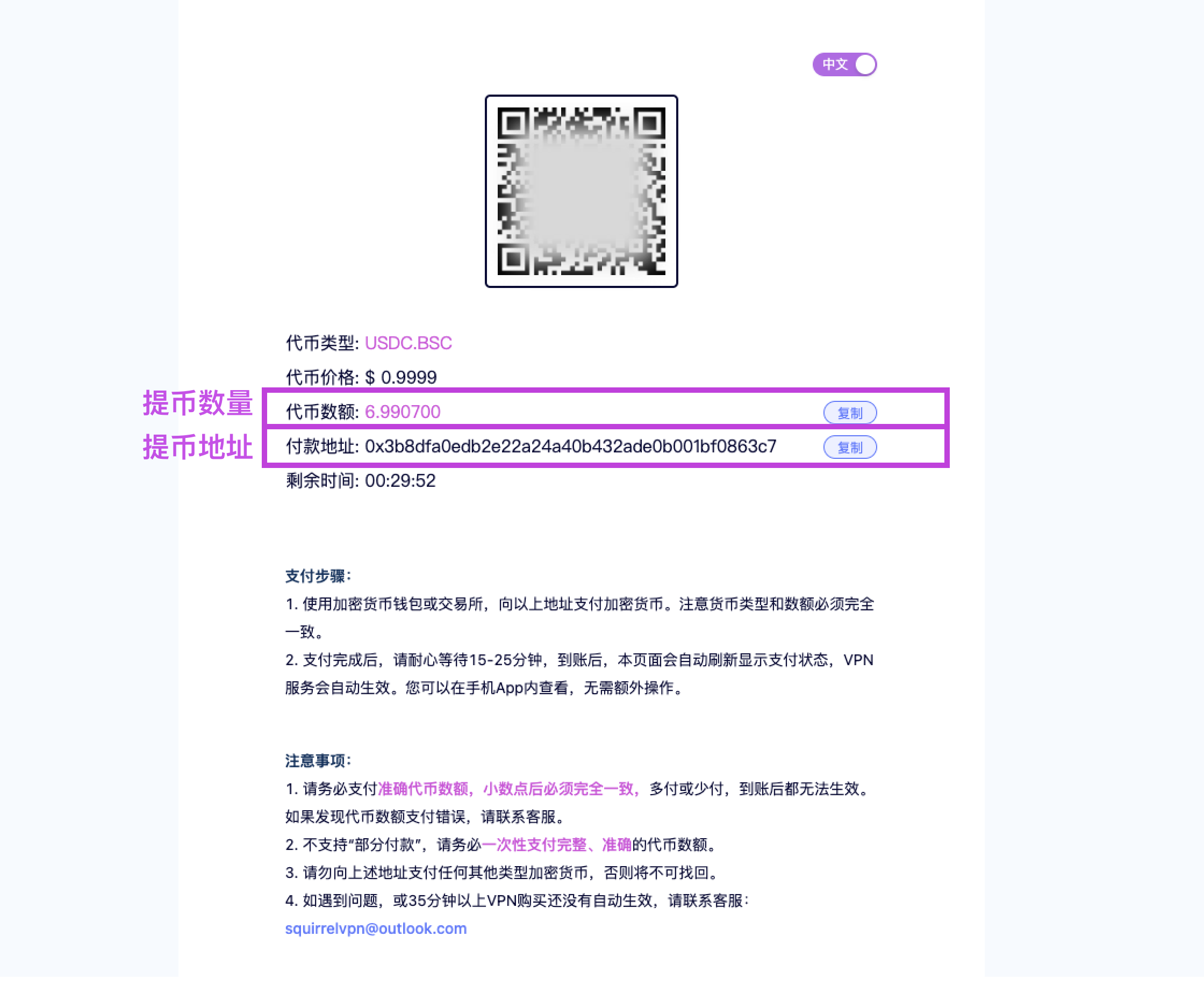
Step2: open QR


Step 4: 거래소에서 암호화폐 출금하기

이제 본인의 거래소나 암호화폐 지갑을 열어 해당 금액만큼의 USDT를 위 주소로 출금해야 합니다. 바이낸스(Binance)를 예로 들어 설명하겠습니다.

(이하 작업은 모바일에서 진행됩니다. 미국 사용자는 VPN을 다른 국가로 연결하고 글로벌 모드를 켜야 합니다. Squirrel VPN 공식 홈페이지에서 다운로드 가능하며, 신규 사용자는 3일 무료 체험이 가능합니다.)

바이낸스 앱을 열고 "자산(Funds) > 현물(Spot) > USDT > 출금(Withdraw)"을 선택합니다. Step 2에서 선택한 USDT.BEP20(BSC)을 예로 듭니다.
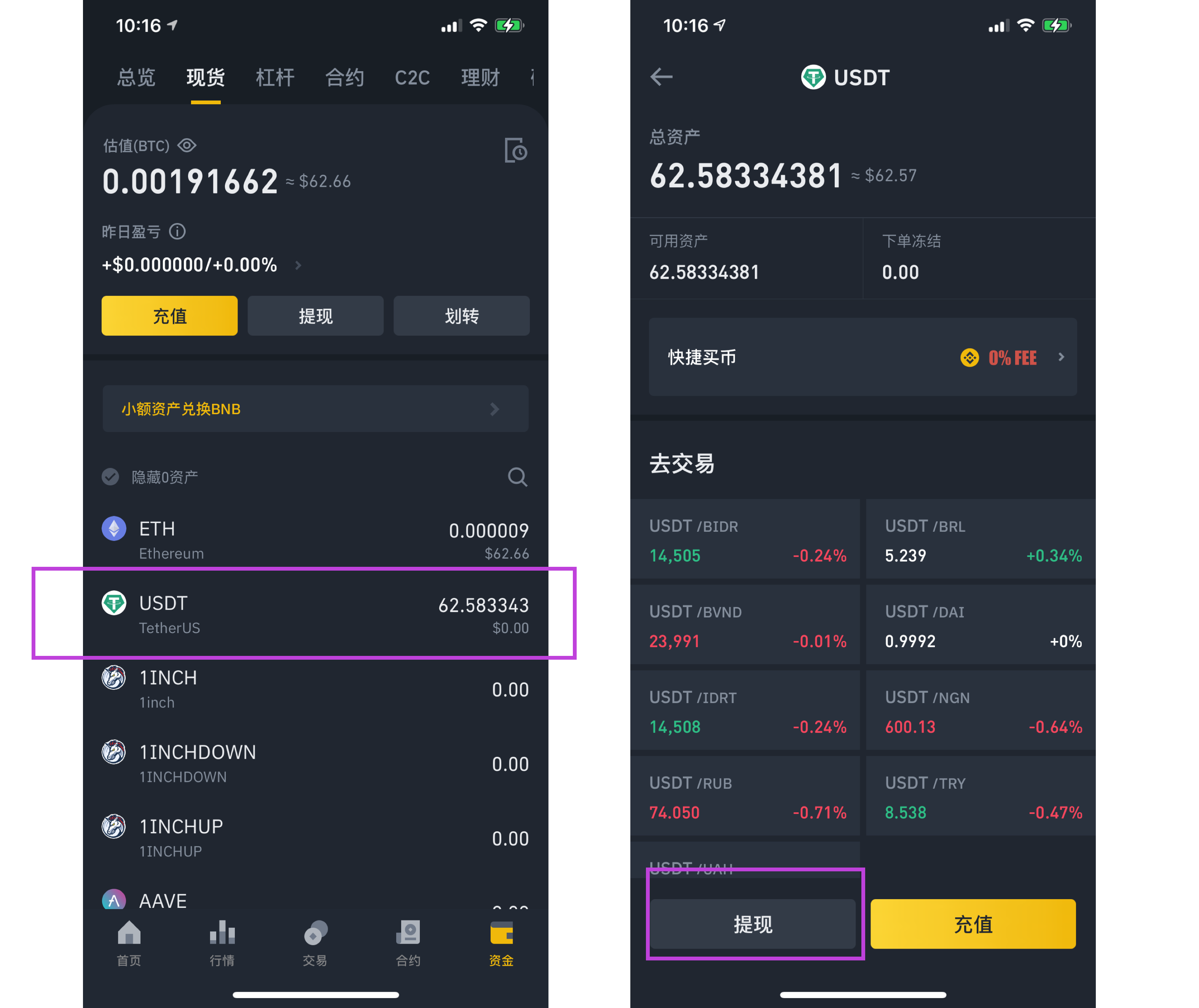
Step3: open Binance

결제 주소: 카메라를 켜서 결제 페이지의 "QR 코드"를 스캔하거나 주소를 복사하여 붙여넣습니다.
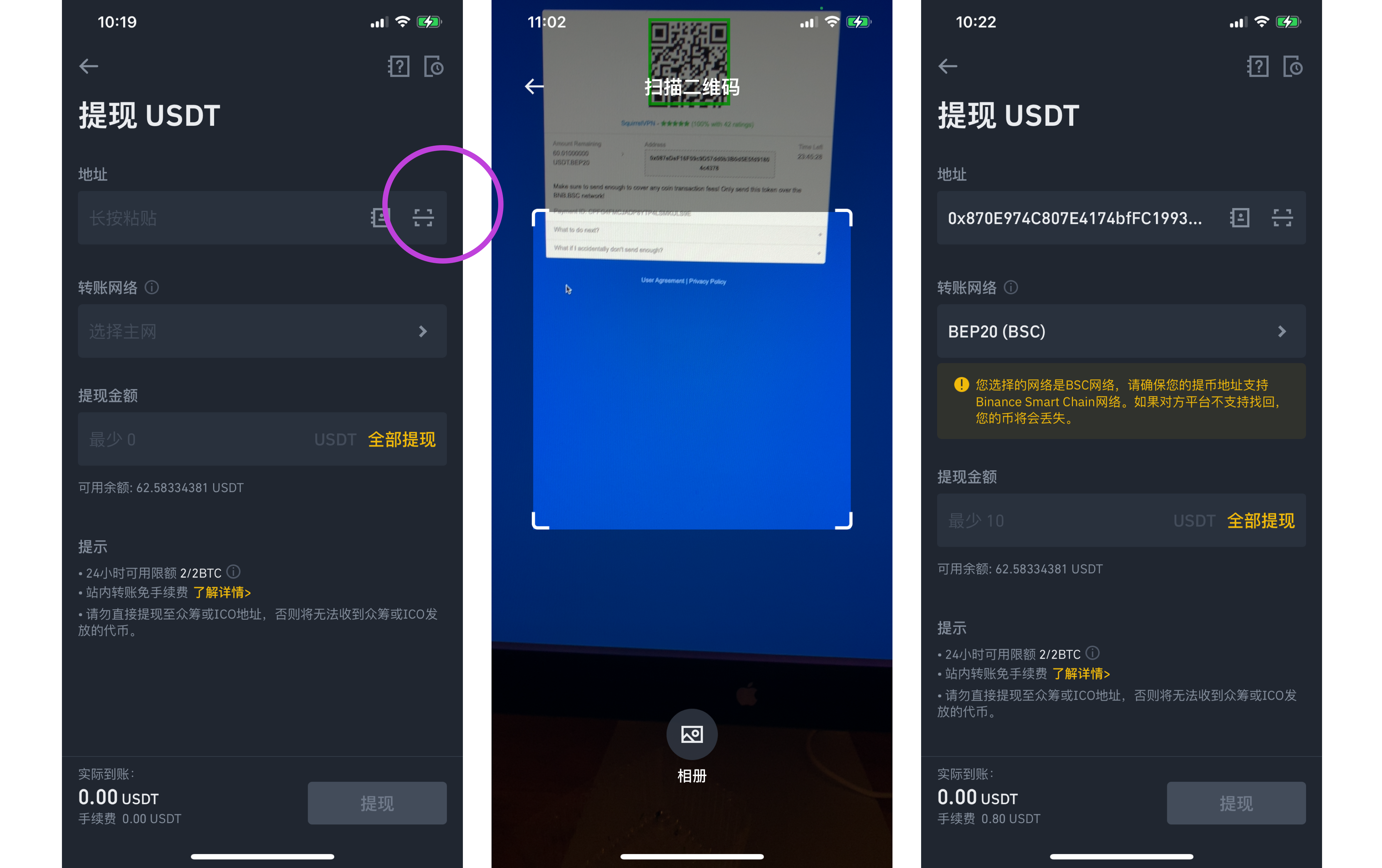
Step3: open Binance

체인 선택: "전송 네트워크(Transfer Network)"를 열고 해당 블록체인 종류를 선택합니다. 일반적으로 ERC20, BSC, HECO 등이 있으며, 결제 페이지의 정보에 따라 반드시 올바른 네트워크를 선택해야 합니다.
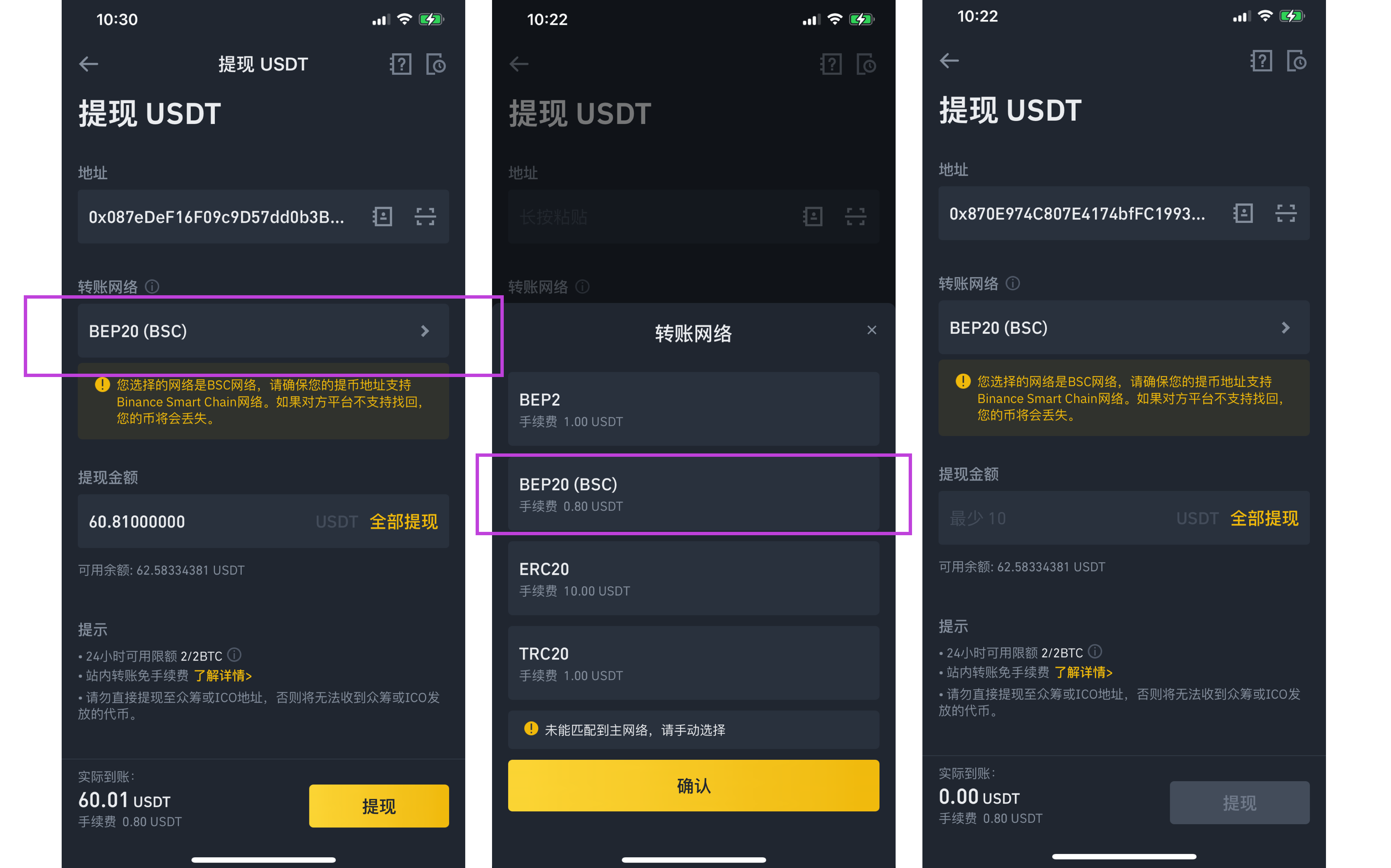
Step3: open Binance

결제 금액: 금액(토큰 수량)을 복사하여 붙여넣습니다. 실제 입금되는 수량이 판매자 결제 페이지에 표시된 수량과 완전히 일치하는지 확인하세요.
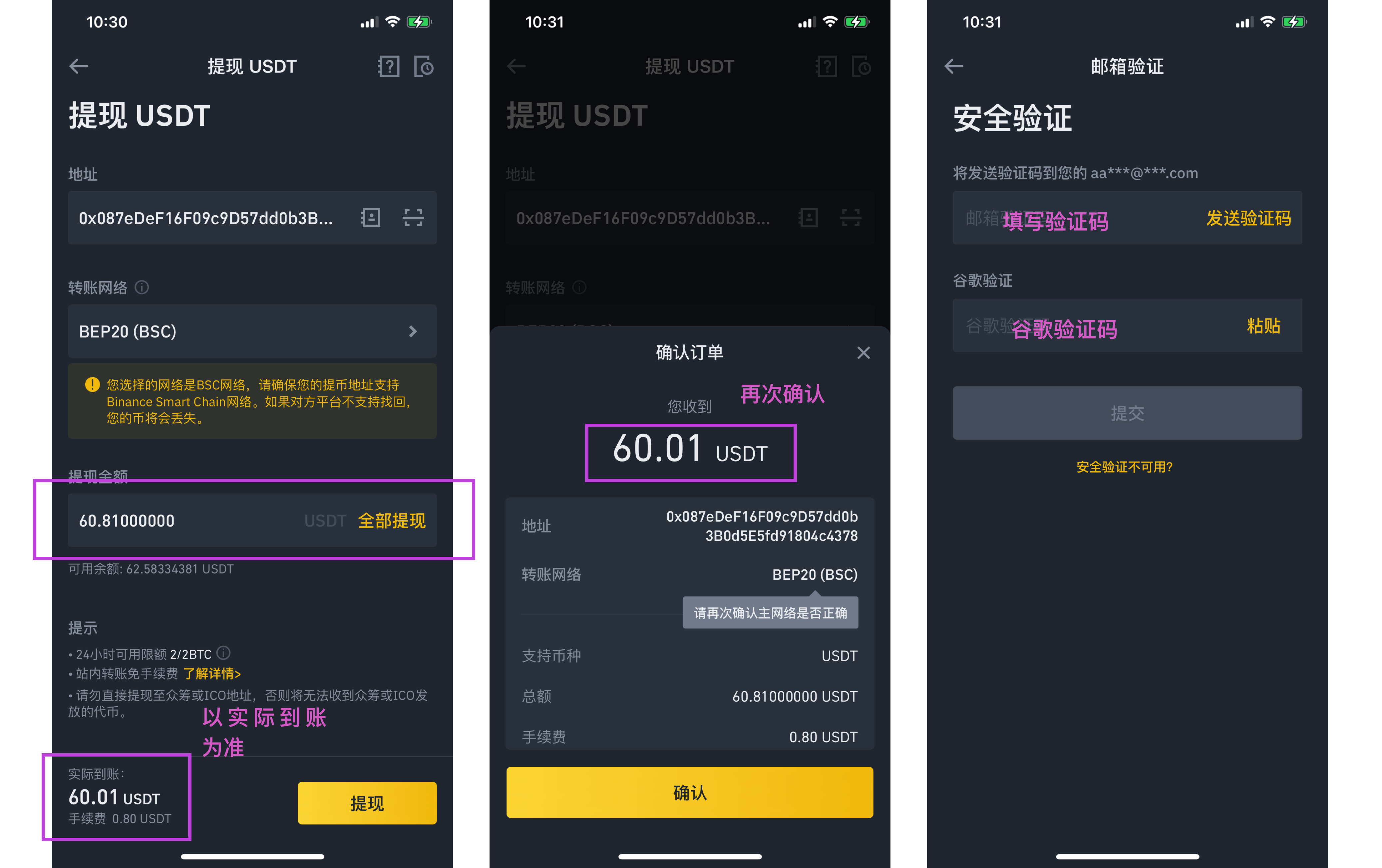
Step3: open Binance

마지막으로 이메일 인증, 구글 인증을 완료하면 결제가 끝납니다!


완료!


기타 게시물:

RMB로 암호화폐 구매하는 방법 8분 만에 미국 Apple ID 등록하기 Squirrel VPN 자주 묻는 질문(FAQ)

Squirrel 공식 홈페이지 대체 공식 홈페이지(VPN 불필요)

T
Tom Jefferson

CEO & Co-Founder


Expert VPN analyst

관련 기사

Decentralized Tunneling Protocols and P2P Onion Routing Architecture
Decentralized Tunneling Protocol

Decentralized Tunneling Protocols and P2P Onion Routing Architecture

Explore the architecture of p2p onion routing and decentralized tunneling protocols. Learn how web3 vpn and depin are creating a new bandwidth marketplace.

작성자 Daniel Richter 2026년 3월 20일 10 분 소요
common.read_full_article
Cryptographic Accounting for P2P Bandwidth Sharing Economy
P2P Bandwidth Sharing

Cryptographic Accounting for P2P Bandwidth Sharing Economy

Learn how blockchain and cryptographic accounting power the P2P bandwidth sharing economy in dVPNs and DePIN projects for secure data monetization.

작성자 Viktor Sokolov 2026년 3월 20일 8 분 소요
common.read_full_article
Integration of Zero-Knowledge Proofs for Anonymous Node Authentication
Zero-Knowledge Proofs

Integration of Zero-Knowledge Proofs for Anonymous Node Authentication

Learn how Integration of Zero-Knowledge Proofs for Anonymous Node Authentication secures dVPN networks and protects bandwidth miners in the Web3 era.

작성자 Marcus Chen 2026년 3월 20일 9 분 소요
common.read_full_article
Zero-Knowledge Proofs for Anonymous Node Validation
Zero-Knowledge Proofs

Zero-Knowledge Proofs for Anonymous Node Validation

Learn how Zero-Knowledge Proofs (ZKPs) enable anonymous node validation in decentralized VPNs (dVPN) and DePIN networks to protect provider privacy.

작성자 Marcus Chen 2026년 3월 19일 7 분 소요
common.read_full_article